EIR-OPS-006.1: TC Authentication
Objective
To enable on-board authentication of telecommands received by the spacecraft during commissioning.
Introduction
Using this procedure, the Operator will test and enable the HMAC (Hash-based Message Authentication Code) feature that allows the spacecraft to authenticate received TCs. TC authentication is essential to reduce the risk of replay attacks.
Procedure
This procedure contains the following sub-procedures:
Note
Communication with the spacecraft is required for Sections B - E of this procedure.
A. Pre-Pass Preparations
A.1.
Prior to the pass in which this procedure is followed, confirm with the Software and/or Systems Engineers that the ground segment is configured with the same HMAC key as the spacecraft.
B. Pre-Authentication Checks
Important
You are about to send the first TC of this procedure - Have you completed the EIR-OPS-003: Start a Communication Pass procedure? A Communication Pass must be started prior to carrying out the operations planned for the pass. Don’t forget to et up the parameters/actions that will be used during the pass in MCS before the pass begins!
B.1.
Getthecomms.HMAC.isKeyValidparameter.Ensure that 1 is returned.
Note
The OBC is programmed to load a ‘valid’ HMAC key (used to generate the code to check the authenticity of incoming TCs) from the initialisation data at boot. Therefore, isKeyValid = 1 is expected. If isKeyValid = 0, a new key must be uploaded to the spacecraft prior to enabling TC authentication.
TC Details |
|
MCS Operation |
|
Action/Param Name |
|
Data Expected with TC |
No |
TM Details |
|
Data Expected from TC |
|
Data Size |
boolean |
Data Info |
Whether the HMAC key is valid (1) or invalid (0) |
Allowed Value(s) |
0 - 1 |
Expected Value(s) |
1 |
B.2.
Warning
Don’t perform this step while a downlink or uplink is on-going as MCS will automatically increase comms.HMAC.sequenceNumber during these activities and so the parameter value you get might quickly become invalid.
Getthecomms.HMAC.sequenceNumberparameter from the spacecraft.
Note
A TC sequence number (essentially a TC counter) is also checked as part of the on-board TC authentication process.
TC Details |
|
MCS Operation |
|
Action/Param Name |
|
Data Expected with TC |
No |
TM Details |
|
Data Expected from TC |
|
Data Size |
3 bytes |
Data Info |
The current TC sequence number stored on-board the spacecraft |
Allowed Value(s) |
000000 - FFFFFF (hex) |
Expected Value(s) |
> 0 |
B.3.
Get MCS’s TC sequence number (see Figure 1 for details on accessing this parameter).
Compare the sequence number returned in the previous step to that of MCS, and confirm these numbers match before proceeding.
Tip
Ensure that both values are represented as either decimal or hex values before comparing!
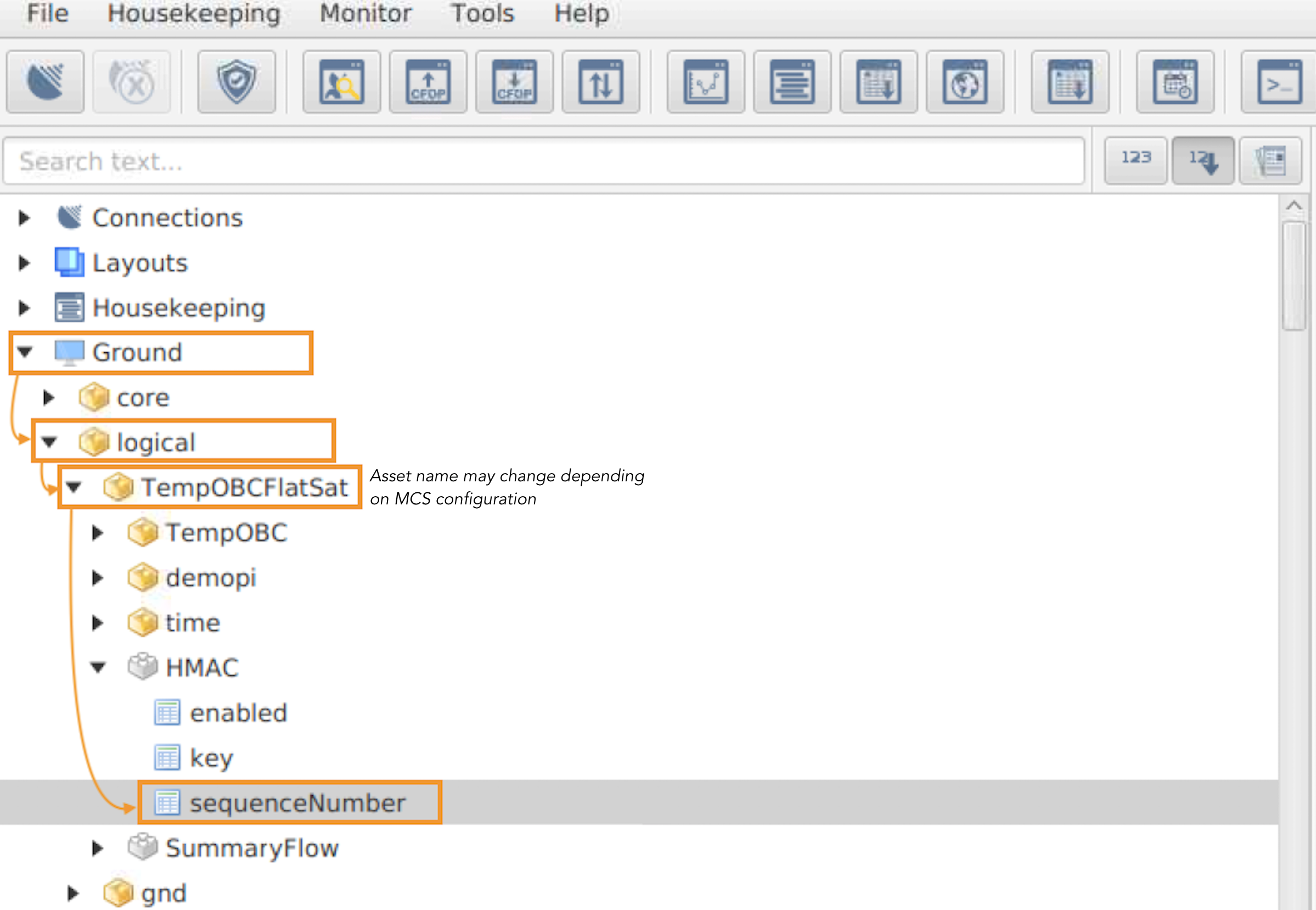
Figure 1 - Path to the MCS TC sequenceNumber, which is used by MCS to generate TCs with HMAC authentication framing.
C. Enable Authentication Time-out
Note
The TimeAction component is used to automatically trigger an on-board action (i.e. to Invoke an action or Set a parameter) after a user-defined period of time. In this procedure, the TimeAction component will be used to disable TC authentication after the user-defined time period has elapsed. This is a safety feature to ensure that communication with the spacecraft can be secured with TC authentication enabled before fully enabling authentication.
C.1.
Warning
The 3rd entry of the cdh.scheduling.TimeAction.entryTime parameter contains the time for the TC authentication timeout. This is the reason for setting the First Row = Last Row = 2. However, this is only the case for the primary images. If failsafe is the current boot image when following this procedure, First Row = Last Row = 1 should instead be used.
To ensure the TimeAction is ready for use,
Invokethecdh.scheduling.TimeAction.restartRelativeEntriesaction with the action argument = 2.
TC Details |
|
MCS Operation |
|
Action/Param Name |
|
Data Expected with TC |
|
Data Size |
1 byte |
Data Info |
The index of the relative entry to restart |
Allowed Value(s) |
0 - 255 (dec) |
Expected Value(s) |
2 |
TM Details |
|
Data Expected from TC |
No ( + ACK ) |
C.2.
Warning
If failsafe is the current boot image when following this procedure, First row = Last row = 1 should instead be used in this step.
To check the timeout duration,
Getthecdh.scheduling.TimeAction.entryTimeparameter, withFirst row=Last row= 2.
Note
This is the time the satellite will wait before TC authentication is disabled (i.e. the time until isAuthenticating is set as 0).
TC Details |
|
MCS Operation |
|
Action/Param Name |
|
Data Expected with TC |
|
Data Size |
2 bytes, 2 bytes |
Data Info |
The first and last rows/indexes of the parameter to get |
Allowed Value(s) |
0 - 511, 0 - 511 (dec) |
Expected Value(s) |
2, 2 |
TM Details |
|
Data Expected from TC |
|
Data Size |
4 bytes |
Data Info |
Time (in seconds) for the authentication timeout |
Allowed Value(s) |
00000000 - FFFFFFFF (hex) |
C.3.
Warning
If failsafe is the current boot image when following this procedure, First row = Last row = 1 should instead be used in this step.
If
cdh.scheduling.TimeAction.entryTimeis already configured with the desired timeout, proceed to Step C.5.Else,
Setthecdh.scheduling.TimeAction.entryTimeparameter, withFirst row=Last row= 2, to the desired value.
Tip
It can be beneficial (but is not necessary) to set entryTime > the wait-time to the next communication pass, as:
The spacecraft will then be protected from replay attacks between the passes, and
If the Operator doesn’t get time to disable the TimeAction timeout in a given pass, they will have time to do so during the next pass rather than needing to repeat this procedure from scratch.
TC Details |
|
MCS Operation |
|
Action/Param Name |
|
Data Expected with TC |
|
Data Size |
2 bytes, 2 bytes, 4 bytes |
Data Info |
The first and last rows/indexes of the parameter to set + the desired |
Allowed Value(s) |
0 - 511, 0 - 511 (dec), 00000000 - FFFFFFFF (hex) |
Expected Value(s) |
2, 2, > 0 |
TM Details |
|
Data Expected from TC |
No ( + ACK ) |
C.4.
Confirm the
Setin the previous step with aGet(i.e. confirm the value was set successfully).
C.5.
Warning
If failsafe is the current boot image when following this procedure, First row = Last row = 1 should instead be used in this step.
Prior to enabling this TC authentication timeout,
Getthecdh.scheduling.TimeAction.entryEnabledparameter, withFirst row=Last row= 2.Ensure that it is 0 (disabled).
TC Details |
|
MCS Operation |
|
Action/Param Name |
|
Data Expected with TC |
|
Data Size |
2 bytes, 2 bytes |
Data Info |
The first and last rows/indexes of the parameter to get |
Allowed Value(s) |
0 - 511, 0 - 511 (dec) |
Expected Value(s) |
2, 2 |
TM Details |
|
Data Expected from TC |
|
Data Size |
boolean |
Data Info |
Whether the TimeAction entry is enabled (1) or disabled (0) |
Allowed Value(s) |
0 - 1 |
Expected Value(s) |
0 |
C.6.
Warning
If failsafe is the current boot image when following this procedure, First row = Last row = 1 should instead be used in this step.
To then enable this TC authentication timeout,
Setthecdh.scheduling.TimeAction.entryEnabledparameter, withFirst row=Last row= 2, to 1 (i.e. enabled).
Note
Once this timeout is enabled, the TimeAction component will trigger the action (to disable TC authentication) and Set the entryEnabled parameter back to 0 after the time period ends regardless of whether TC authentication has actually been enabled or not yet.
TC Details |
|
MCS Operation |
|
Action/Param Name |
|
Data Expected with TC |
|
Data Size |
2 bytes, 2 bytes, boolean |
Data Info |
The first and last rows/indexes of the parameter to set + the desired |
Allowed Value(s) |
0 - 511, 0 - 511, 0 - 1 (dec) |
Expected Value(s) |
2, 2, 1 |
TM Details |
|
Data Expected from TC |
No ( + ACK ) |
C.7.
Confirm the
Setin the previous step with aGet(i.e. confirm the value was set successfully).
D. Enable TC Authentication and Disable Timeout
D.1.
Getthecomms.HMAC.isAuthenticatingparameter.Ensure that 0 is returned (i.e. that TC authentication is disabled).
TC Details |
|
MCS Operation |
|
Action/Param Name |
|
Data Expected with TC |
No |
TM Details |
|
Data Expected from TC |
|
Data Size |
boolean |
Data Info |
Whether TC authentication is enabled (1) or disabled (0) |
Allowed Value(s) |
0 - 1 |
Expected Value(s) |
0 |
D.2.
To then enable authentication of TCs received by the spacecraft,
Setthecomms.HMAC.isAuthenticatingparameter to 1 (i.e. enabled).
TC Details |
|
MCS Operation |
|
Action/Param Name |
|
Data Expected with TC |
|
Data Size |
boolean |
Data Info |
The desired |
Allowed Value(s) |
0 - 1 |
Expected Value(s) |
1 |
TM Details |
|
Data Expected from TC |
No ( + ACK ) |
D.3.
To verify that packets generated by the EIRSAT-1 ground station are now being successfully received and authenticated by the spacecraft,
Getthecomms.HMAC.isAuthenticatingparameter.Ensure 1 (i.e. authenticating enabled) is returned.
Tip
If no TM is received from this TC, or a live error event is all that is observed in response to the TC, check the following:
That TC authentication framing is enabled on MCS,
That the HMAC key being used on the ground is correct (requires input from the GS and OBSW engineers), and
That the TC sequence number on MCS is consistent with the value observed in the S/C’s beacon data.
TC Details |
|
MCS Operation |
|
Action/Param Name |
|
Data Expected with TC |
No |
TM Details |
|
Data Expected from TC |
|
Data Size |
boolean |
Data Info |
Whether TC authentication is enabled (1) or disabled (0) |
Allowed Value(s) |
0 - 1 |
Expected Value(s) |
1 |
D.4.
Warning
If failsafe is the current boot image when following this procedure, First row = Last row = 1 should instead be used in this step.
Once you have ensured TCs are successfully received and acknowledged by the spacecraft (demonstrating that the authentication set-up on-board and on the ground are in-sync and are operating successfully), the TC authentication timeout can be disabled. To do this, first…
Getthecdh.scheduling.TimeAction.entryEnabledparameter, withFirst row=Last row= 2, and ensure that it is 1 (i.e. enabled).
TC Details |
|
MCS Operation |
|
Action/Param Name |
|
Data Expected with TC |
Yes |
Data Size |
2 bytes, 2 bytes |
Data Info |
|
Allowed Value(s) |
0 - 511, 0 - 511 (dec) |
Expected Value(s) |
2, 2 |
TM Details |
|
Data Expected from TC |
|
Data Size |
boolean |
Data Info |
Whether the TimeAction entry is enabled (1) or disabled (0) |
Allowed Value(s) |
0 - 1 |
Expected Value(s) |
1 |
D.5.
Warning
If failsafe is the current boot image when following this procedure, First row = Last row = 1 should instead be used in this step.
To then disable this TC authentication timeout,
Setthecdh.scheduling.TimeAction.entryEnabledparameter, withFirst row=Last row= 2, to 0 (i.e. disabled).
TC Details |
|
MCS Operation |
|
Action/Param Name |
|
Data Expected with TC |
|
Data Size |
2 bytes, 2 bytes, boolean |
Data Info |
The first and last rows/indexes of the parameter to set + the desired |
Allowed Value(s) |
0 - 511, 0 - 511, 0 - 1 (dec) |
Expected Value(s) |
2, 2, 0 |
TM Details |
|
Data Expected from TC |
No ( + ACK ) |
D.6.
Confirm the
Setin the previous step with aGet(i.e. confirm the value was set successfully).
D.7.
Next,
Getthecomms.HMAC.isAuthenticatingparameter.Ensure that 1 is returned (i.e. that TC authentication is still enabled).
TC Details |
|
MCS Operation |
|
Action/Param Name |
|
Data Expected with TC |
No |
TM Details |
|
Data Expected from TC |
|
Data Size |
boolean |
Data Info |
Whether TC authentication is enabled (1) or disabled (0) |
Allowed Value(s) |
0 - 1 |
Expected Value(s) |
1 |
E. Verification
E.1.
During a later communication pass (i.e. after the timeout period from Step C.3. has elapsed),
Getthecomms.HMAC.isAuthenticatingparameter.Ensure that 1 is returned (i.e. that TC authentication is still enabled).
Important
While waiting to achieve this verification, the Operators may proceed with other planned procedures in the meantime.
TC Details |
|
MCS Operation |
|
Action/Param Name |
|
Data Expected with TC |
No |
TM Details |
|
Data Expected from TC |
|
Data Size |
boolean |
Data Info |
Whether TC authentication is enabled (1) or disabled (0) |
Allowed Value(s) |
0 - 1 |
Expected Value(s) |
1 |
END OF PROCEDURE