EIR-OPS-033: Enable/Disable RF Transmission
Objective
To disable/re-enable RF transmission from the spacecraft.
Introduction
Using this procedure, the Operator will disable transmission of data/beacons from the spacecraft over the RF link. RF transmission should not be re-enabled until a TC instructing the spacecraft to do so is sent. Therefore, we must ensure the RF inhibit persists even through reboots. To ensure this is the case, the Operator will first boot the failsafe image before disabling transmission.
Warning
This procedure should only be followed in the case where the ITU have requested that the EIRSAT-1 spacecraft cease RF transmission.
Procedure
This procedure contains the following sub-procedures:
Note
A communication window is required for all sections of this procedure.
Important
The Operator should follow Section A.I OR A.II, NOT BOTH, depending on whether the failsafe image has previously been booted or not.
A.I. Preparations for Tx Disable - Failsafe previously booted
Important
You are about to send the first TC of this procedure - Have you completed the ‘Start a Communication Pass’ procedure? A Communication Pass must be started prior to carrying out the operations planned for the pass. Don’t forget to open and set up the parameters/actions that will be used during the pass in MCS before the pass begins!
A.I.1.
Boot the failsafe image by following the EIR-OPS-024: Boot Into OBC Image procedure.
Ensure the correct SCDB is loaded as part of this procedure.
A.I.2.
Getthemission.SeparationSequence.stateparameter.Confirm that the Separation Sequence is in its finished state (i.e. 0x42).
TC Details |
|
MCS Operation |
|
Action/Param Name |
|
Data Expected with TC |
No |
TM Details |
|
Data Expected from TC |
|
Data Size |
1 byte |
Data Info |
The current state of the Separation Sequence |
Allowed Value(s) |
00 - 09 or 42 (Hex) |
Expected Value(s) |
0x42 (Hex) / 66 (Dec) |
A.I.3.
Getthe parameterplatform.EPS.actualSwitchStateswithFirst row= 0 andLast row= 9.Confirm that all PDMs are off/0.
Warning
PDM 8 is drawing parasitic power. Therefore, when you Get the platform.EPS.actualSwitchStates parameter it will always read as ON/1 even when it is powered OFF.
TC Details |
|
MCS Operation |
|
Action/Param Name |
|
Data Expected with TC |
|
Data Size |
2 bytes, 2 bytes |
Data Info |
The first and last rows/indexes of the parameter to get |
Allowed Value(s) |
0 - 9, 0 - 9 |
Expected Value(s) |
0, 9 |
TM Details |
|
Data Expected from TC |
|
Data Size |
List[0:9] of booleans |
Data Info |
If |
Allowed Value(s) |
0,0,0,0,0,0,0,0,0,0 (all OFF) - 1,1,1,1,1,1,1,1,1,1 (all ON) |
Expected Value(s) |
0,0,0,0,0,0,0,1,0,0 |
A.I.4.
Getthe parameterplatform.ADCS.adcsModeState.Confirm that the ADCS is operating in Stand-by Mode/Nadir State (i.e. 0x0000).
TC Details |
|
MCS Operation |
|
Action/Param Name |
|
Data Expected with TC |
No |
TM Details |
|
Data Expected from TC |
|
Data Size |
4 bytes |
Data Info |
The current mode (2 MSB) and state (2 LSB) of the ADCS |
Allowed Value(s) |
See tables below |
Expected Value(s) |
00000000 |
Where…
|
ADCS Mode |
|---|---|
0000 |
Standby (Default) |
0001 |
Detumble |
0002 |
Spin Stabilised |
5550 |
Test |
|
ADCS State |
|---|---|
0000 |
Nadir (Default) |
AAA8 |
Test |
A.I.5.
Next,
Setthemission.NoTCWatchdogManager.NoTCWatchdogTimeoutparameter to 0 to disable the no TC watchdog, which will lead to reboots and wiping of persisted configuration data if not disabled.
TC Details |
|
TMTCLab Operation |
|
Action/Param Name |
|
Data Expected with TC |
Yes |
Data Size |
1 byte |
Data Info |
The no. of days without a TC before the no TC watchdog triggers |
Allowed Value(s) |
00 - FF (hex) |
Expected Value(s) |
0 (i.e. watchdog disabled) |
TM Details |
|
Data Expected from TC |
No ( + ACK ) |
A.I.6.
Confirm the
Setin the previous step with aGet(i.e. confirm the value was set successfully).
A.I.7.
For added mission safety while RF transmissions are disabled, and if time allows, it is advised that the Operators follow the EIR-OPS-009: Enable TC Authentication procedure to enable TC Authentication.
If time does not allow for TC Authentication to be enabled, skip ahead to Section B.
A.I.8.
As 2-way communications will be lost when RF transmissions are disabled such that the successful reception of TCs by the spacecraft may not reliably be known, it is also advised that the Operators now
Setthecomms.HMAC.updateSeqNumparameter to 0, to freeze the spacecraft’s TC sequence counter at a known value.
TC Details |
|
MCS Operation |
|
Action/Param Name |
|
Data Expected with TC |
Yes |
Data Size |
1 byte |
Data Info |
Whether S/C’s TC sequence counter is incrementing (1) or not (0) |
Allowed Value(s) |
0 - 1 |
Expected Value(s) |
0 |
TM Details |
|
Data Expected from TC |
No ( + ACK ) |
A.I.9.
Confirm the
Setin the previous step with aGet(i.e. confirm the value was set successfully).
A.I.10.
Getthecomms.HMAC.sequenceNumberparameter several times.Confirm that the parameter is frozen (i.e. not incrementing) and note the parameter value for use in later steps.
Tip
This value should be used in MCS (see Figure 1.A.II) to continue communication with the spacecraft pre- and post- transmission inhibit until Step D.1, when the sequenceNumber is again thawed.
TC Details |
|
MCS Operation |
|
Action/Param Name |
|
Data Expected with TC |
No |
TM Details |
|
Data Expected from TC |
|
Data Size |
3 bytes |
Data Info |
S/C’s TC sequence counter |
Allowed Value(s) |
00 - 0xFFFFFF (Hex) |
Expected Value |
Not incrementing |
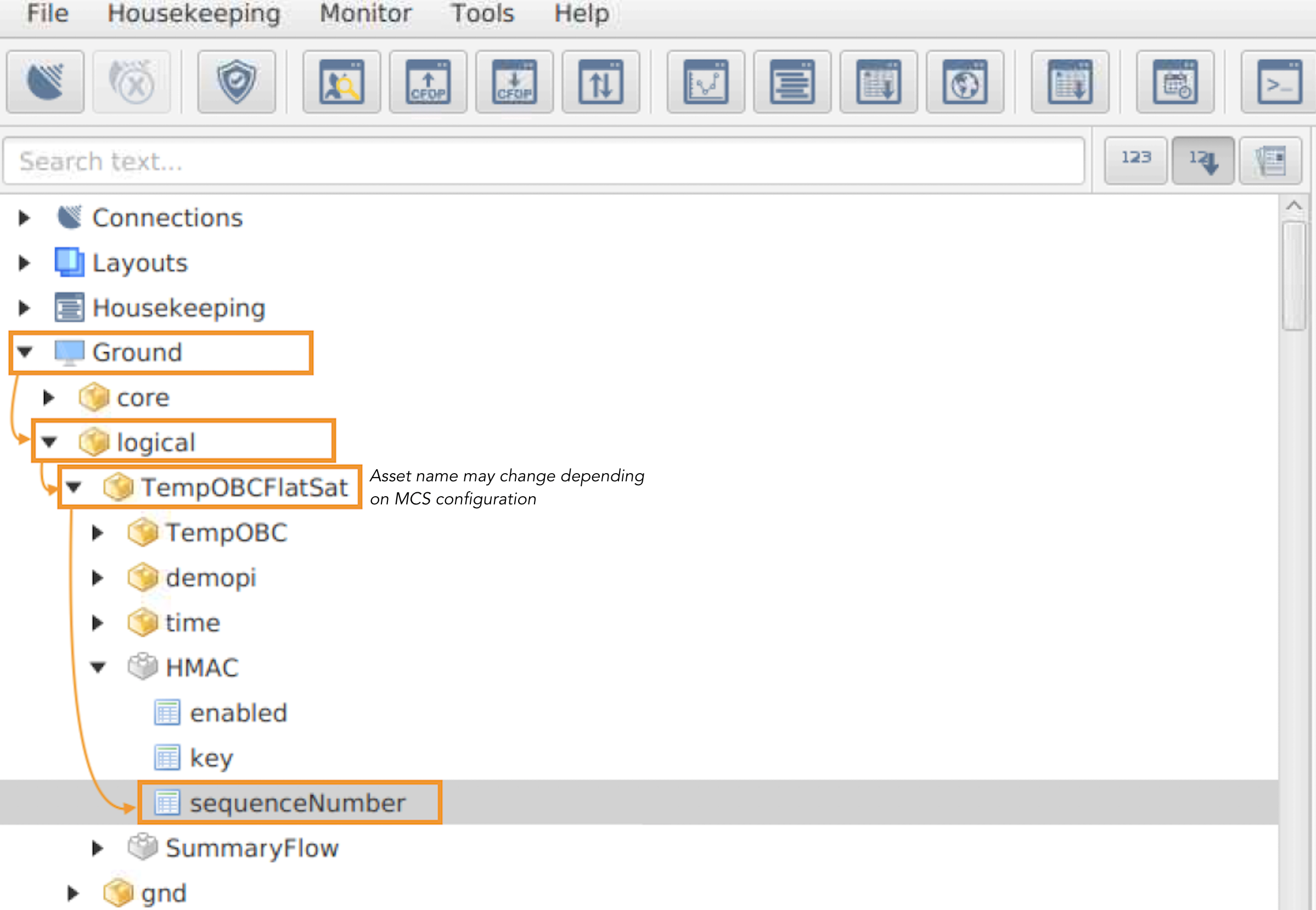
Figure 1.A.I. - Path to the MCS TC sequenceNumber, which is used by MCS to generate TCs with HMAC authentication framing.
A.II. Preparations for Tx Disable - Failsafe NOT previously booted
Important
You are about to send the first TC of this procedure - Have you completed the ‘Start a Communication Pass’ procedure? A Communication Pass must be started prior to carrying out the operations planned for the pass. Don’t forget to open and set up the parameters/actions that will be used during the pass in MCS before the pass begins!
A.II.1.
Follow Sections A and B (do not follow Section C) of the EIR-OPS-024: Boot Into OBC Image procedure to boot the failsafe image.
Ensure the correct SCDB is loaded as part of this procedure.
A.II.2.
As this is the first time failsafe has been booted on-orbit, the image will boot with RF disabled and with the Separation Sequence in its 45-minute post-launch wait state.
Therefore, to enable RF transmissions and allow 2-way communications, the Operator should now
Setthecomms.TMTCBuffer.spacelinkTxEnableparameter to 1.Continue to send this TC until an ACK/response is received from the spacecraft.
TC Details |
|
MCS Operation |
|
Action/Param Name |
|
Data Expected with TC |
Yes |
Data Size |
1 byte |
Data Info |
Whether RF transmission is enabled (1) or disabled (0) |
Allowed Value(s) |
0 - 1 |
Expected Value(s) |
1 |
TM Details |
|
Data Expected from TC |
No ( + ACK ) |
Warning
The Operator should ONLY continue with this procedure if a response was received from the spacecraft in the previous step!!
A.II.3.
To determine which mission image is the current boot image on the OBC,
Gettheplatform.OBC.obc.currBootImageparameter.
TC Details |
|
MCS Operation |
|
Action/Param Name |
|
Data Expected with TC |
No |
TM Details |
|
Data Expected from TC |
|
Data Size |
1 byte |
Data Info |
Index of the currently executing OBC software image |
Allowed Value(s) |
0, 1, 2 |
Where …
Image |
|
failsafe |
0 |
primary1 |
1 |
primary2 |
2 |
A.II.4.
Next,
Invokethemission.SeparationSequence.SeparationSequenceFinishaction.
TC Details |
|
MCS Operation |
|
Action/Param Name |
|
Data Expected with TC |
No |
TM Details |
|
Data Expected from TC |
No ( + ACK ) |
A.II.5.
Getthemission.SeparationSequence.stateparameter.Confirm that the Separation Sequence is in its finished state (i.e. 0x42).
TC Details |
|
MCS Operation |
|
Action/Param Name |
|
Data Expected with TC |
No |
TM Details |
|
Data Expected from TC |
|
Data Size |
1 byte |
Data Info |
The current state of the Separation Sequence |
Allowed Value(s) |
00 - 09 or 42 (Hex) |
Expected Value(s) |
0x42 (Hex) / 66 (Dec) |
A.II.6.
Getthe parameterplatform.EPS.actualSwitchStateswithFirst row= 0 andLast row= 9.Ensure that all PDMs are off/0.
Warning
PDM 8 is drawing parasitic power. Therefore, when you Get the platform.EPS.actualSwitchStates parameter it will always read as ON/1 even when it is powered OFF.
TC Details |
|
MCS Operation |
|
Action/Param Name |
|
Data Expected with TC |
|
Data Size |
2 bytes, 2 bytes |
Data Info |
The first and last rows/indexes of the parameter to get |
Allowed Value(s) |
0 - 9, 0 - 9 |
Expected Value(s) |
0, 9 |
TM Details |
|
Data Expected from TC |
|
Data Size |
List[0:9] of booleans |
Data Info |
If |
Allowed Value(s) |
0,0,0,0,0,0,0,0,0,0 (all OFF) - 1,1,1,1,1,1,1,1,1,1 (all ON) |
Expected Value(s) |
0,0,0,0,0,0,0,1,0,0 |
A.II.7.
Getthe parameterplatform.ADCS.adcsModeState.Confirm that the ADCS is operating in Stand-by Mode/Nadir State (i.e. 0x0000).
TC Details |
|
MCS Operation |
|
Action/Param Name |
|
Data Expected with TC |
No |
TM Details |
|
Data Expected from TC |
|
Data Size |
4 bytes |
Data Info |
The current mode (2 MSB) and state (2 LSB) of the ADCS |
Allowed Value(s) |
See tables below |
Expected Value(s) |
00000000 |
Where…
|
ADCS Mode |
|---|---|
0000 |
Standby (Default) |
0001 |
Detumble |
0002 |
Spin Stabilised |
5550 |
Test |
|
ADCS State |
|---|---|
0000 |
Nadir (Default) |
AAA8 |
Test |
A.II.8.
Next,
Setthemission.NoTCWatchdogManager.NoTCWatchdogTimeoutparameter to 0 to disable the no TC watchdog, which will lead to reboots and wiping of persisted configuration data if not disabled.
TC Details |
|
TMTCLab Operation |
|
Action/Param Name |
|
Data Expected with TC |
Yes |
Data Size |
1 byte |
Data Info |
The no. of days without a TC before the no TC watchdog triggers |
Allowed Value(s) |
00 - FF (hex) |
Expected Value(s) |
0 (i.e. watchdog disabled) |
TM Details |
|
Data Expected from TC |
No ( + ACK ) |
A.II.9.
Confirm the
Setin the previous step with aGet(i.e. confirm the value was set successfully).
A.II.10.
For added mission safety while RF transmissions are disabled, and if time allows, it is advised that the Operators follow the EIR-OPS-009: Enable TC Authentication procedure to enable TC Authentication.
If time does not allow for TC Authentication to be enabled, skip ahead to Section B.
A.II.11.
As 2-way communications will be lost when RF transmissions are disabled such that the successful reception of TCs by the spacecraft may not reliably be known, it is also advised that the Operators now
Setthecomms.HMAC.updateSeqNumparameter to 0, to freeze the spacecraft’s TC sequence counter at a known value.
TC Details |
|
MCS Operation |
|
Action/Param Name |
|
Data Expected with TC |
Yes |
Data Size |
1 byte |
Data Info |
Whether S/C’s TC sequence counter is incrementing (1) or not (0) |
Allowed Value(s) |
0 - 1 |
Expected Value(s) |
0 |
TM Details |
|
Data Expected from TC |
No ( + ACK ) |
A.II.12.
Confirm the
Setin the previous step with aGet(i.e. confirm the value was set successfully).
A.II.13.
Getthecomms.HMAC.sequenceNumberparameter several times.Confirm that the parameter is frozen (i.e. not incrementing) and note the parameter value for use in later steps.
Tip
This value should be used in MCS (see Figure 1.A.II) to continue communication with the spacecraft pre- and post- transmission inhibit until Step D.1, when the sequenceNumber is again thawed.
TC Details |
|
MCS Operation |
|
Action/Param Name |
|
Data Expected with TC |
No |
TM Details |
|
Data Expected from TC |
|
Data Size |
3 bytes |
Data Info |
S/C’s TC sequence counter |
Allowed Value(s) |
00 - 0xFFFFFF (Hex) |
Expected Value |
Not incrementing |
Figure 1.A.II - Path to the MCS TC sequenceNumber, which is used by MCS to generate TCs with HMAC authentication framing.
B. Tx Disable
B.1.
To now disable RF transmission,
Setthecomms.TMTCBuffer.spacelinkTxEnableparameter to 0 (i.e. disabled).
Warning
As RF transmission is disabled via this TC, no response/ACK is expected from the spacecraft.
TC Details |
|
MCS Operation |
|
Action/Param Name |
|
Data Expected with TC |
Yes |
Data Size |
1 byte |
Data Info |
Whether RF transmission is enabled (1) or disabled (0) |
Allowed Value(s) |
0 - 1 |
Expected Value(s) |
0 |
TM Details |
|
Data Expected from TC |
TIMEOUT |
C. Tx Enable
Note
This section, as well as the following section, should be carried out following confirmation from the ITU that EIRSAT-1 can recommence RF transmission.
C.1.
Compare the sequence number returned from the spacecraft at the end of Section A to that of MCS at this current time (see Figure 1.A.I/II for details on accessing this parameter).
Confirm that both values are represented as either decimal or hex values before then ensuring that the previously known on-board and ground segment sequence numbers match.
C.2.
To re-enable RF transmission,
Setthecomms.TMTCBuffer.spacelinkTxEnableparameter to 1 (i.e. enabled).Repeatedly send this TC until an ACK is returned.
For every TC with no ACK/response, the Operators should reset the MCS sequence number (see Figure 1.A.I/II) to match that of the spacecraft.
TC Details |
|
MCS Operation |
|
Action/Param Name |
|
Data Expected with TC |
Yes |
Data Size |
1 byte |
Data Info |
Whether RF transmission is enabled (1) or disabled (0) |
Allowed Value(s) |
0 - 1 |
Expected Value(s) |
1 |
TM Details |
|
Data Expected from TC |
No ( + ACK ) |
D. Post Tx Enable
D.1.
To re-enable the no TC watchdog,
Setthemission.NoTCWatchdogManager.NoTCWatchdogTimeoutparameter to its default value of 3 (days).
TC Details |
|
TMTCLab Operation |
|
Action/Param Name |
|
Data Expected with TC |
Yes |
Data Size |
1 byte |
Data Info |
The no. of days without a TC before the no-GS-TC watchdog triggers |
Allowed Value(s) |
00 - FF (hex) |
Expected Value(s) |
03 (hex) |
TM Details |
|
Data Expected from TC |
No ( + ACK ) |
D.2.
Confirm the
Setin the previous step with aGet(i.e. confirm the value was set successfully).
D.3.
Next,
Setthecomms.HMAC.updateSeqNumparameter to 1 to thaw the spacecraft’s TC sequence counter.
TC Details |
|
MCS Operation |
|
Action/Param Name |
|
Data Expected with TC |
Yes |
Data Size |
1 byte |
Data Info |
Whether S/C’s TC sequence counter is incrementing (1) or not (0) |
Allowed Value(s) |
0 - 1 |
Expected Value(s) |
1 |
TM Details |
|
Data Expected from TC |
No ( + ACK ) |
D.4.
Confirm the
Setin the previous step with aGet(i.e. confirm the value was set successfully).
D.5.
Getthecomms.HMAC.sequenceNumberparameter several times.Confirm the parameter is increasing by 1 following each TC.
TC Details |
|
MCS Operation |
|
Action/Param Name |
|
Data Expected with TC |
No |
TM Details |
|
Data Expected from TC |
|
Data Size |
3 bytes |
Data Info |
S/C’s TC sequence counter |
Allowed Value(s) |
00 - 0xFFFFFF (Hex) |
Expected Value |
Increasing |
D.6.
Prior to exiting failsafe and resuming nominal operations, and taking into consideration the length of time that RF Tx was disabled, the Operator should now consult with the team to determine what data downlink and health checks need to be performed to assess whether any anomalies occurred while RF transmission was disabled that could pose a risk to the mission going forward.
Important
If remaining in the failsafe image for an extended period of time, the Operator should now ensure TC Authentication is enabled.
D.7.
If the data confirms that the spacecraft’s health is nominal, the Operator should now follow the EIR-OPS-024: Boot Into OBC Image procedure to boot a primary image.
D.8.
If the primary image is successfully booted and is stable (i.e. no reboots to failsafe), the Operator can proceed with nominal operations (i.e. Nominal Mode with the experiment running and data logging on-going) using the procedures in this manual (e.g. see EIR-OPS-012: Set Up Nominal Operations ).
END OF PROCEDURE