EIR-OPS-003: Start a Communication Pass
Objective
To begin a communication pass with EIRSAT-1, determine the current state of the satellite and initiate downlinks and/or other procedures.
Introduction
Using this procedure, the Operator can start a communication pass with the satellite. As part of this, the Operator will determine the current boot image of the satellite, the uptime (i.e. elapsed time since the last reboot), the Operational Mode (if applicable), the number of GRB detected in GMOD data (if applicable) and will start an LDT (if applicable).
Figure 1 presents the different possible outcomes of beginning a communication pass with EIRSAT-1. The flow chart shows the consecutive sequence of steps that must be followed depending on the Current Boot Image and Mode (i.e. platform.obc.OBC.currBootImage and mission.ModeManager.mode ) the satellite is in. The procedure below addresses all the possible branches of events.
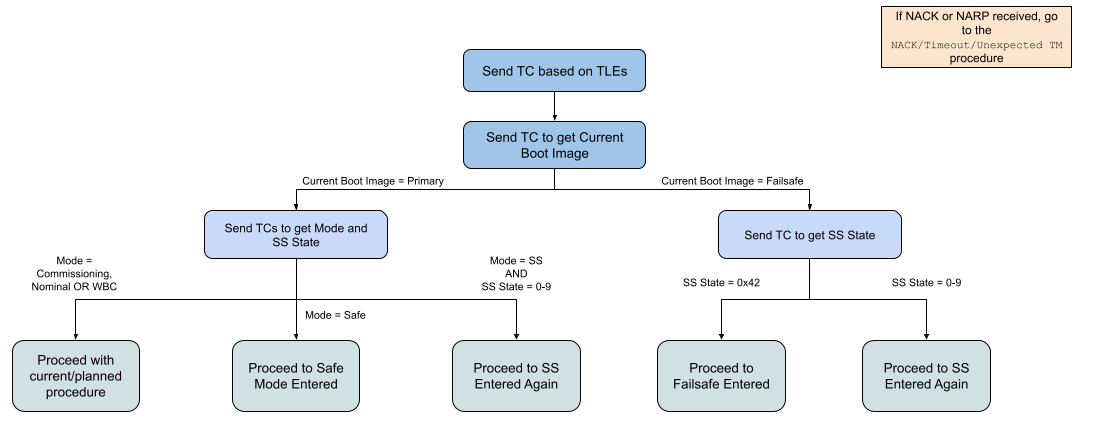
Figure 1 - Flow chart of possible events and tasks to be followed when starting a communication pass
Procedure
A.1.
Gettheplatform.obc.OBC.currBootImageparameter frequently (i.e. with ~10 seconds between each TC).Begin sending these TCs ~30 seconds before the expected time of AOS.
After each TC where no TM is received, set MCS’s TC
sequenceNumberback to its value from before the pass (see Figure 2 for details on accessing this parameter).Continue to send these TCs until:
TM is received from EIRSAT-1 (as per the TM/TC Details table),
The expected time of LOS has passed, or
An issue is expected with the communications chain. Refer to EIR-OPS-032: Separation Sequence Restarted for some guidance in this case and request support from senior team members!
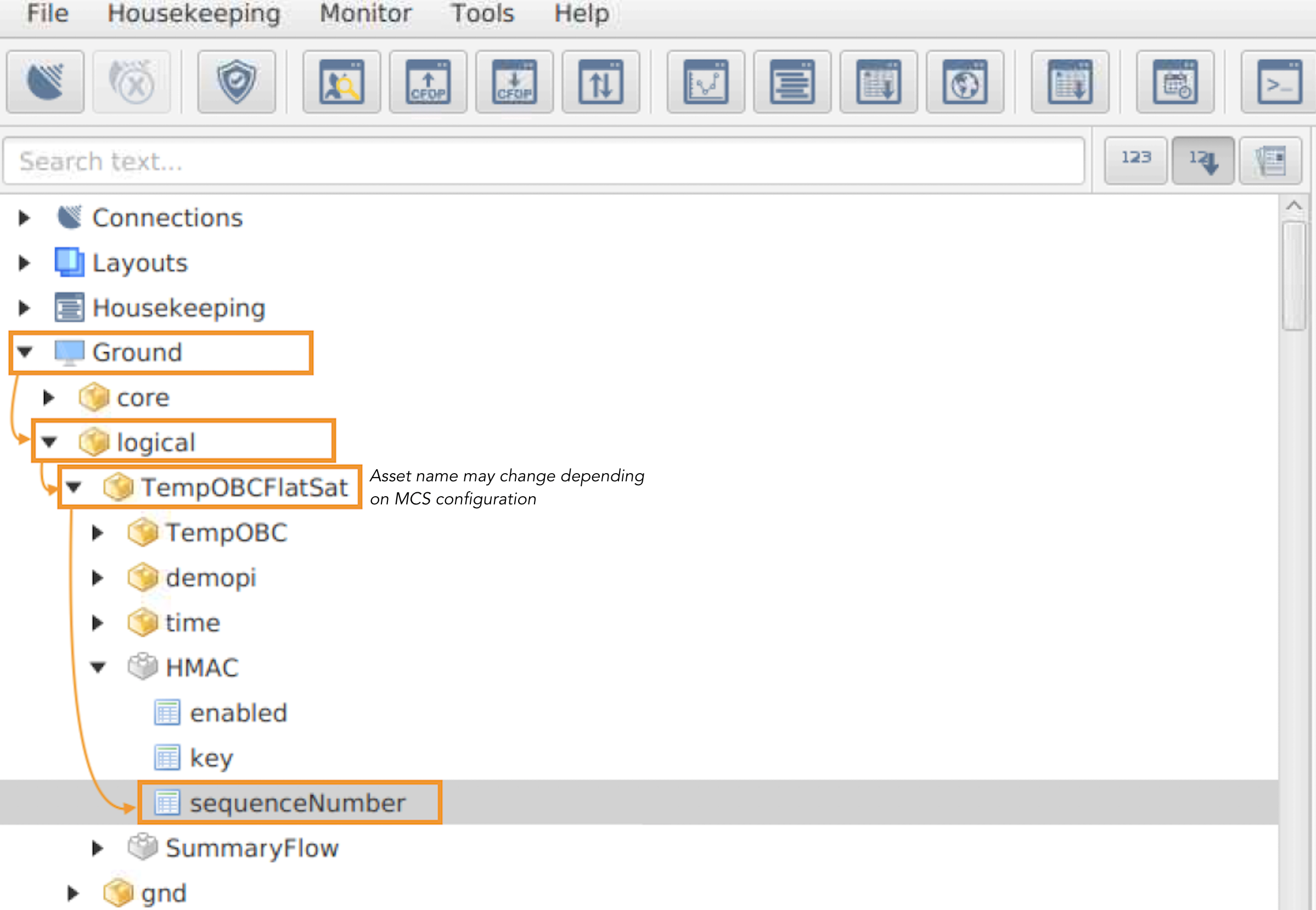
Figure 2 - Path to the MCS TC sequenceNumber , which is used by MCS to generate TCs with HMAC authentication framing.
TC Details |
|
MCS Operation |
|
Action/Param Name |
|
Data Expected with TC |
No |
TM Details |
|
Data Expected from TC |
|
Data Size |
1 byte |
Data Info |
Index of the currently executing OBC software image |
Allowed Value(s) |
0, 1, 2 |
Where …
Image |
|
failsafe |
0 |
primary1 |
1 |
primary2 |
2 |
A.2.
Based on the
currBootImage:Ensure the appropriate SCDB is loaded into MCS, and
Determine what step to proceed to next using the below table.
currBootImageNext step
0
Skip to Step A.5. As there is no ModeManager in failsafe and so ModeManager-related steps should be skipped.
1 or 2
Proceed to Step A.3.
A.3.
Invokethemission.ModeManager.startPassaction to start a communication pass.
Note
Enabling a communication pass will enable automatic and periodic transmission of live HK data from the spacecraft in place of the TM beacon data, which is transmitted outside of the pass. Automatic transmission of any on-board events raised during the pass will also be enabled throughout the pass. This on-board behavior will automatically time-out ~3 minutes after the last TC is received by the spacecraft.
TC Details |
|
MCS Operation |
|
Action/Param Name |
|
Data Expected with TC |
No |
TM Details |
|
Data Expected from TC |
No ( + ACK ) |
A.4.
Getthemission.ModeManager.Modeparameter to determine the current Operational Mode of the satellite.
TC Details |
|
MCS Operation |
|
Action/Param Name |
|
Data Expected with TC |
No |
TM Details |
|
Data Expected from TC |
|
Data Size |
1 byte |
Data Info |
Current Operational Mode of the satellite |
Allowed Value(s) |
0 - 4 |
Where …
|
Operational Mode |
|---|---|
0 |
Separation Sequence |
1 |
Commissioning |
2 |
Nominal |
3 |
WBC |
4 |
Safe |
Tip
The next steps of this procedure primarily instruct the Operators to Get parameters, with no instruction on what to do about the returned TM. This is because this information will be used in later steps of this procedure and/or to assist the data analyses of other procedures.
A.5.
Getthemission.SeparationSequence.stateparameter.
TC Details |
|
MCS Operation |
|
Action/Param Name |
|
Data Expected with TC |
No |
TM Details |
|
Data Expected from TC |
|
Data Size |
1 byte |
Data Info |
Current state of the Separation Sequence |
Allowed Value(s) |
00 - 09 or 66 (dec) |
Expected Value(s) |
66 (i.e. the finished state), if initial AOS is complete |
A.6.
Getthecore.OBT.uptimeparameter to determine the elapsed time since the last reboot.
TC Details |
|
MCS Operation |
|
Action/Param Name |
|
Data Expected with TC |
No |
TM Details |
|
Data Expected from TC |
|
Data Size |
4 bytes |
Data Info |
Uptime (i.e. elapsed time since the last reboot) |
Allowed Value(s) |
00000000 - FFFFFFFF (hex) |
Expected Value(s) |
> 0 |
A.7.
Gettheplatform.EPS.busVoltagesparameter withFirst row=Last row= 0 to determine the on-board voltage levels.
Danger
If busVoltages[0] <780 (dec), which corresponds to ~7.0V, the Operators are advised to postpone initiating any procedures in this pass in which the spacecraft consumes more power. This includes procedures that lead to increased RF transmissions, powering ON/enabling experiments and operating the ADCS. In the case where data downlinking is required for failure analyses, a limited amount of data downlinking is permitted.
TC Details |
|
MCS Operation |
|
Action/Param Name |
|
Data Expected with TC |
|
Data Size |
2 bytes, 2 bytes |
Data Info |
The first and last rows/indexes of the parameter to get |
Allowed Value(s) |
0 - 3 |
Expected Value(s) |
0, 0 |
TM Details |
|
Data Expected from TC |
|
Data Size |
Int10 |
Data Info |
|
Allowed Value(s) |
0 - 1023 (dec) |
A.8.
Gettheplatform.CMC.tempaturePaparameter to determine the CMC PA temperature.
Danger
If temperaturePa >50 degrees Celsius, the Operators are advised to postpone initiating any procedures in this pass in which a significant amount of RF transmissions are likely. In this case, the Operators should monitor temperaturePa and only initiate such procedures when the parameter value falls below 45 degrees Celsius.
TC Details |
|
MCS Operation |
|
Action/Param Name |
|
Data Expected with TC |
No |
TM Details |
|
Data Expected from TC |
|
Data Size |
signed Int8 |
Data Info |
Temperature of the CMC power amplifier in degrees C |
Allowed Value(s) |
-128 - 128 (dec) |
A.9.
If
currBootImage= 0 (i.e. failsafe) in Step A.1, skip ahead to the next step.Else, if GMOD has previously been experiment running,
Getthepayload.GMOD.GRBTriggerCountparameter to determine the current number of potential GRBs that have been detected in GMOD data.
Note
The GMOD payload does not need to be on for this Get TC. Also note that the Operator is not expected to immediately act if the GRB trigger count has increased since the last pass. The data from this TC is instead noted to facilitate future pass planning.
TC Details |
|
MCS Operation |
|
Action/Param Name |
|
Data Expected with TC |
No |
TM Details |
|
Data Expected from TC |
|
Data Size |
2 bytes |
Data Info |
Number of GRB triggers raised by the OBC |
Allowed Value(s) |
0 - 65535 (dec) |
A.10.
The Operators should now proceed with LDTs, and/or any other procedures given the instructions in the table below. However, this should be done with care for the current state of the spacecraft (i.e. as the ‘Danger’ boxes advise in Steps A.7 and A.8.).
Important
LDTs should only be requested one at a time! When a transfer is complete, another can be started using the EIR-OPS-011: Downlink Data From Storage procedure. Get / Set TCs of other procedures may be carried out in parallel to LDTs, however, it should be noted that in this case the TM response time will be slowed.
Danger
If currBootImage = 0/failsafe, live transmission of event data is not enabled as part of this procedure, and so the operator should be careful to monitor the CMC PA temperature (i.e. platform.CMC.temperaturePa ) when downlinking data during the pass.
If |
|
|
Proceed to EIR-OPS-029: Failsafe Entered |
|
|
|
Proceed to EIR-OPS-032: Separation Sequence Restarted |
If |
|
|
Proceed to EIR-OPS-025: Safe Mode Entered |
|
Proceed to EIR-OPS-039: WBC Monitor Transition to Commissioning Mode |
|
Proceed to EIR-OPS-032: Separation Sequence Restarted |
Else… |
|
|
Proceed to EIR-OPS-011: Downlink Data From Storage and any other planned procedures. |
Tip
If Operators are reverted to one of the unplanned procedures in the table above, data downlink instructions are provided within each procedure.
END OF PROCEDURE