EIR-OPS-011: Downlink Data From Storage
Objective
To downlink the contents of an on-board storage channel.
Introduction
Using this procedure, the Operator will downlink multiple rows of data from a specific on-board storage channel.
Procedure
This procedure contains the following sub-procedures:
Note
Communication with the spacecraft is required for Sections B - C of this procedure.
A. Pre-Pass Preparations
A.1.
The Operator should now open ROW . This Google Sheet aims to help the Operator to quickly determine what
First RowandLast Rowvalues to use when downlinking data fromcore.storage.channelContentin the next sections of this procedure.To use this tool, the Operator must provide information from previous passes and so, this Google Sheet should be reviewed and filled-in as required prior to the up-coming pass, with the following questions in mind:
What data type(s) do you want to downlink?
What percentage of the pass time do you want to allocate to downlinking the different data types?
If constrained by the time, do you want to give priority to the newest or oldest rows of data?
A.2.
The Operator should also now take note of the
cdh.logging.XXXLoggerpath(s) required to obtain theAbsRowsLoggedparameter(s) in Step C.1, as well as the Channel ID(s) required for theDownlinkTC in Step C.3. This information is provided in ROW .
B. Tx Convolutional Encoding Management
Important
To increase throughput when downlinking large amounts of data, Tx convolutional encoding should be disabled. To ensure good communication while encoding is disabled, the Z-axis MTQ cannot be active. Therefore, it will be necessary to place the ADCS into Standby Mode during this time. TimeActions will be used to return the ADCS and comms configurations to normal after the pass. This section of the procedure should only be carried out ONCE PER PASS.
Tip
If the Operators only intend to downlink a small quantity of data, this section may be skipped if it is acceptable that the downlink occurs at half the rate.
Warning
This section of the procedure SHOULD NOT BE FOLLOWED during the initial passes of the mission, until the GS team confirm that 2-way communications is sufficiently stable.
ADCS Mode TimeAction
Important
You are about to send the first TC of this procedure - Have you completed the EIR-OPS-003: Start a Communication Pass procedure? A Communication Pass must be started prior to carrying out the operations planned for the pass. Don’t forget to set up the parameters/actions that will be used during the pass in MCS before the pass begins!
B.1.
Getthe parameterplatform.ADCS.adcsModeStateto determine the current ADCS mode and state.Note the data returned for use in the next steps.
TC Details |
|
MCS Operation |
|
Action/Param Name |
|
Data Expected with TC |
No |
TM Details |
|
Data Expected from TC |
|
Data Size |
4 bytes |
Data Info |
The current mode (2 MSB) and state (2 LSB) of the ADCS |
Allowed Value(s) |
See tables below |
Where…
|
ADCS Mode |
|---|---|
0000 |
Standby (Default) |
0001 |
Detumble |
0002 |
Spin Stabilised |
5550 |
Test |
|
ADCS State |
|---|---|
0000 |
Nadir (Default) |
AAA8 |
Test |
B.2.
If:
Commissioning of the spacecraft is on-going, proceed to Step D.1 (unless instructed otherwise) as we do not want to disable convolutional encoding during this time.
adcsModeState= 5550AAA8 (hex), proceed to Step D.1 as we do not want to disable Tx convolutional encoding during test/WBC activities with the ADCS.adcsModeState= 00000000 (hex), proceed to Step B.13 as the ADCS is already operating in Stand-by Mode.
Warning
If failsafe is the current boot image when following this procedure, the action argument should instead = 0 in this step.
Else,
Invokethecdh.scheduling.TimeAction.restartRelativeEntriesaction with the action argument = 1.
TC Details |
|
MCS Operation |
|
Action/Param Name |
|
Data Expected with TC |
|
Data Size |
1 byte |
Data Info |
The index of the relative entry to restart |
Allowed Value(s) |
0 - 255 (dec) |
Expected Value(s) |
1 |
TM Details |
|
Data Expected from TC |
No ( + ACK ) |
B.3.
Warning
If failsafe is the current boot image when following this procedure, First row = Last row = 0 should instead be used in this step.
Getthecdh.scheduling.TimeAction.entryListPackedparameter withFirst row=Last row= 1.Take note of the last 4 bytes (i.e. the last 8 hex characters) of this parameter, which follow ‘04’ when viewed in hex format, for use in the next step.
TC Details |
|
MCS Operation |
|
Action/Param Name |
|
Data Expected with TC |
|
Data Size |
2 bytes, 2 bytes |
Data Info |
The first and last rows/indexes of the parameter to get |
Allowed Value(s) |
0 - 511, 0 - 511 (dec) |
Expected Value(s) |
1, 1 |
TM Details |
|
Data Expected from TC |
|
Data Size |
19 bytes |
Data Info |
The schedule entry list as packed records |
B.4.
Warning
If failsafe is the current boot image when following this procedure, First row = Last row = 0 should instead be used in this step.
If the 4 bytes noted in the previous step do not match
adcsModeStatefrom Step B.1, edit these bytes in the data field of thecdh.scheduling.TimeAction.entryListPackedparameter window to matchadcsModeStatefrom Step B.1 andSetthe parameter withFirst row=Last row= 1.Else, skip ahead to Step B.6.
TC Details |
|
MCS Operation |
|
Action/Param Name |
|
Data Expected with TC |
|
Data Size |
2 bytes, 2 bytes, 19 bytes |
Data Info |
The first and last rows/indexes of the parameter to set + the desired |
Allowed Value(s) |
0 - 511, 0 - 511 (dec), many variation allowed (hex) |
Expected Value(s) |
1, 1, last 4 bytes = |
TM Details |
|
Data Expected from TC |
No ( + ACK ) |
B.5.
Confirm the
Setin the previous step with aGet(i.e. confirm the value was set successfully).
B.6.
Warning
If failsafe is the current boot image when following this procedure, First row = Last row = 0 should instead be used in this step.
Setthecdh.scheduling.TimeAction.entryTimeparameter, withFirst row=Last row= 1, to 600 (dec).
TC Details |
|
MCS Operation |
|
Action/Param Name |
|
Data Expected with TC |
|
Data Size |
2 bytes, 2 bytes, 4 bytes |
Data Info |
The first and last rows/indexes of the parameter to set + the desired |
Allowed Value(s) |
0 - 511, 0 - 511 (dec), 00000000 - FFFFFFFF (hex) |
Expected Value(s) |
1, 1, 600 (dec) |
TM Details |
|
Data Expected from TC |
No ( + ACK ) |
B.7.
Confirm the
Setin the previous step with aGet(i.e. confirm the value was set successfully).
B.8.
Warning
If failsafe is the current boot image when following this procedure, First row = Last row = 0 should instead be used in this step.
Prior to enabling this TimeAction,
Getthecdh.scheduling.TimeAction.entryEnabledparameter, withFirst row=Last row= 1.Ensure that it is 0 (disabled).
TC Details |
|
MCS Operation |
|
Action/Param Name |
|
Data Expected with TC |
|
Data Size |
2 bytes, 2 bytes |
Data Info |
The first and last rows/indexes of the parameter to get |
Allowed Value(s) |
0 - 511, 0 - 511 (dec) |
Expected Value(s) |
1, 1 |
TM Details |
|
Data Expected from TC |
|
Data Size |
boolean |
Data Info |
Whether the TimeAction entry is enabled (1) or disabled (0) |
Allowed Value(s) |
0 - 1 |
Expected Value(s) |
0 |
B.9.
Warning
If failsafe is the current boot image when following this procedure, First row = Last row = 0 should instead be used in this step.
Setthecdh.scheduling.TimeAction.entryEnabledparameter, withFirst row=Last row= 1, to 1 (i.e. enabled).
TC Details |
|
MCS Operation |
|
Action/Param Name |
|
Data Expected with TC |
|
Data Size |
2 bytes, 2 bytes, boolean |
Data Info |
The first and last rows/indexes of the parameter to set + the desired |
Allowed Value(s) |
0 - 511, 0 - 511, 0 - 1 (dec) |
Expected Value(s) |
1, 1, 1 |
TM Details |
|
Data Expected from TC |
No ( + ACK ) |
B.10.
Confirm the
Setin the previous step with aGet(i.e. confirm the value was set successfully).
B.11.
Setthe parameterplatform.ADCS.adcsModeStateto 00000000 (hex).
TC Details |
|
MCS Operation |
|
Action/Param Name |
|
Data Expected with TC |
|
Data Size |
4 bytes |
Data Info |
ADCS Mode and State to set |
Allowed Value(s) |
See table in Step B.1. |
Expected Value(s) |
00000000 (hex) |
TM Details |
|
Data Expected from TC |
No ( + ACK ) |
B.12.
Confirm the
Setin the previous step with aGet(i.e. confirm the value was set successfully).
Tx Convolution Encoding TimeAction
B.13.
Warning
If failsafe is the current boot image when following this procedure, the action argument should instead = 2 in this step.
Invokethecdh.scheduling.TimeAction.restartRelativeEntriesaction with the action argument = 3.
TC Details |
|
MCS Operation |
|
Action/Param Name |
|
Data Expected with TC |
|
Data Size |
1 byte |
Data Info |
The index of the relative entry to restart |
Allowed Value(s) |
0 - 255 (dec) |
Expected Value(s) |
3 |
TM Details |
|
Data Expected from TC |
No ( + ACK ) |
B.14.
Warning
If failsafe is the current boot image when following this procedure, First row = Last row = 2 should instead be used in this step.
Setthecdh.scheduling.TimeAction.entryTimeparameter, withFirst row=Last row= 3, to 600 (dec).
TC Details |
|
MCS Operation |
|
Action/Param Name |
|
Data Expected with TC |
|
Data Size |
2 bytes, 2 bytes, 4 bytes |
Data Info |
The first and last rows/indexes of the parameter to set + the desired |
Allowed Value(s) |
0 - 511, 0 - 511 (dec), 00000000 - FFFFFFFF (hex) |
Expected Value(s) |
3, 3, 600 (dec) |
TM Details |
|
Data Expected from TC |
No ( + ACK ) |
B.15.
Confirm the
Setin the previous step with aGet(i.e. confirm the value was set successfully).
B.16.
Warning
If failsafe is the current boot image when following this procedure, First row = Last row = 2 should instead be used in this step.
Prior to enabling this TimeAction,
Getthecdh.scheduling.TimeAction.entryEnabledparameter, withFirst row=Last row= 3.Ensure that it is 0 (disabled).
TC Details |
|
MCS Operation |
|
Action/Param Name |
|
Data Expected with TC |
|
Data Size |
2 bytes, 2 bytes |
Data Info |
The first and last rows/indexes of the parameter to get |
Allowed Value(s) |
0 - 511, 0 - 511 (dec) |
Expected Value(s) |
3, 3 |
TM Details |
|
Data Expected from TC |
|
Data Size |
boolean |
Data Info |
Whether the TimeAction entry is enabled (1) or disabled (0) |
Allowed Value(s) |
0 - 1 |
Expected Value(s) |
0 |
B.17.
Warning
If failsafe is the current boot image when following this procedure, First row = Last row = 2 should instead be used in this step.
Setthecdh.scheduling.TimeAction.entryEnabledparameter, withFirst row=Last row= 3, to 1 (i.e. enabled).
TC Details |
|
MCS Operation |
|
Action/Param Name |
|
Data Expected with TC |
|
Data Size |
2 bytes, 2 bytes, boolean |
Data Info |
The first and last rows/indexes of the parameter to set + the desired |
Allowed Value(s) |
0 - 511, 0 - 511, 0 - 1 (dec) |
Expected Value(s) |
3, 3, 1 |
TM Details |
|
Data Expected from TC |
No ( + ACK ) |
B.18.
Confirm the
Setin the previous step with aGet(i.e. confirm the value was set successfully).
B.19.
Gettheplatform.CMC.txConvEnabledparameter.Confirm it is 1 (i.e. convolutional encoding is enabled).
TC Details |
|
MCS Operation |
|
Action/Param Name |
|
Data Expected with TC |
No |
TM Details |
|
Data Expected from TC |
|
Data Size |
Boolean |
Data Info |
Whether convolutional encoding is enabled (1) or disabled (0) |
Allowed Value(s) |
0 - 1 |
Expected Value(s) |
1 |
B.20.
To disable convolutional encoding,
Settheplatform.CMC.txConvEnabledparameter to 0 (disabled).
TC Details |
|
MCS Operation |
|
Action/Param Name |
|
Data Expected with TC |
|
Data Size |
Boolean |
Data Info |
Enable (1) or disable (0) convolutional encoding |
Allowed Value(s) |
0 - 1 |
Expected Value(s) |
0 |
TM Details |
|
Data Expected from TC |
No ( + ACK ) |
B.21.
Confirm the
Setin the previous step with aGet(i.e. confirm the value was set successfully).
C. Data Downlink
C.1.
Getthecdh.logging.XXXLogger.AbsRowsLoggedparameter for the Logger, whereXXX= HK, TED, Event, ADCS, etc.
TC Details |
|
MCS Operation |
|
Action/Param Name |
|
Data Expected with TC |
No |
TM Details |
|
Data Expected from TC |
|
Data Size |
4 bytes |
Data Info |
The absolute number of rows ever logged to this channel |
Allowed Value(s) |
0 - FFFFFFFF (hex) |
C.2.
Input the TM from the previous step into the relevant cell of ROW . When this value have been provided, the Google Sheet will automatically offer options for
First RowandLast Rowvalues to use in the next step.
C.3.
Downlinkfrom thecore.storage.channelContentparameter with:The
Parameter index in blockfield to equal the ID (in decimal) of the channel from which data is to be downlinked, andThe
First rowandLast Rowfields to equal the chosen values from Step C.2.
Tip
When Downlink is clicked, MCS will prompt the Operator for a filename. To facilitate starting the LDT promptly, provide a short, temporary filename (e.g. ‘HK’, ‘TED’, etc.). A filename extension is not required.
TC Details |
|
MCS Operation |
|
Action/Param Name |
|
Data Expected with TC |
Yes |
Data Size |
2 bytes; 2 bytes; 2 bytes |
Data Info |
|
Allowed Value(s) |
0001 - FFFF, 0000 - FFFF and 0000 - FFFF (Hex) |
TM Details |
|
Data Expected from TC |
Data ( + ACK ) |
Data Size |
n bytes, where n = size of requested data |
Data Info |
Requested data |
C.4.
Confirm from the Transfer Window in MCS that the LDT is now on-going.
Warning
LDTs can sometimes fail in an acceptable way, e.g. due to the on-board storage being ‘busy’ when the OBSW attempted to access the requested data. When a transfer is progressing successfully, the Transfer Window should state the the LDT is ‘In progress’ (see Figure 1). However, if a fail occurs and ‘Suspended’ is instead observed, select the LDT in the Transfer Window and click the ‘Resume’ button.
This may happen multiple times but should not happen so frequently that the transfer does not progress by some amount (%) in-between the attempts to resume the transfer. If the transfer persistently fails, do NOT continue with attempts to resume the LDT or with the remainder of the procedure until the Software and/or Systems Engineer have reviewed the issue.
This option to ‘resume’ a failed LDT is only applicable to multi-part LDTs (referred to as ‘Multi-DLink’ LDTs in MCS/Figure 1). Smaller downlinks that do not generate an associated Multi-DLink pane in MCS must be restarted from scratch.
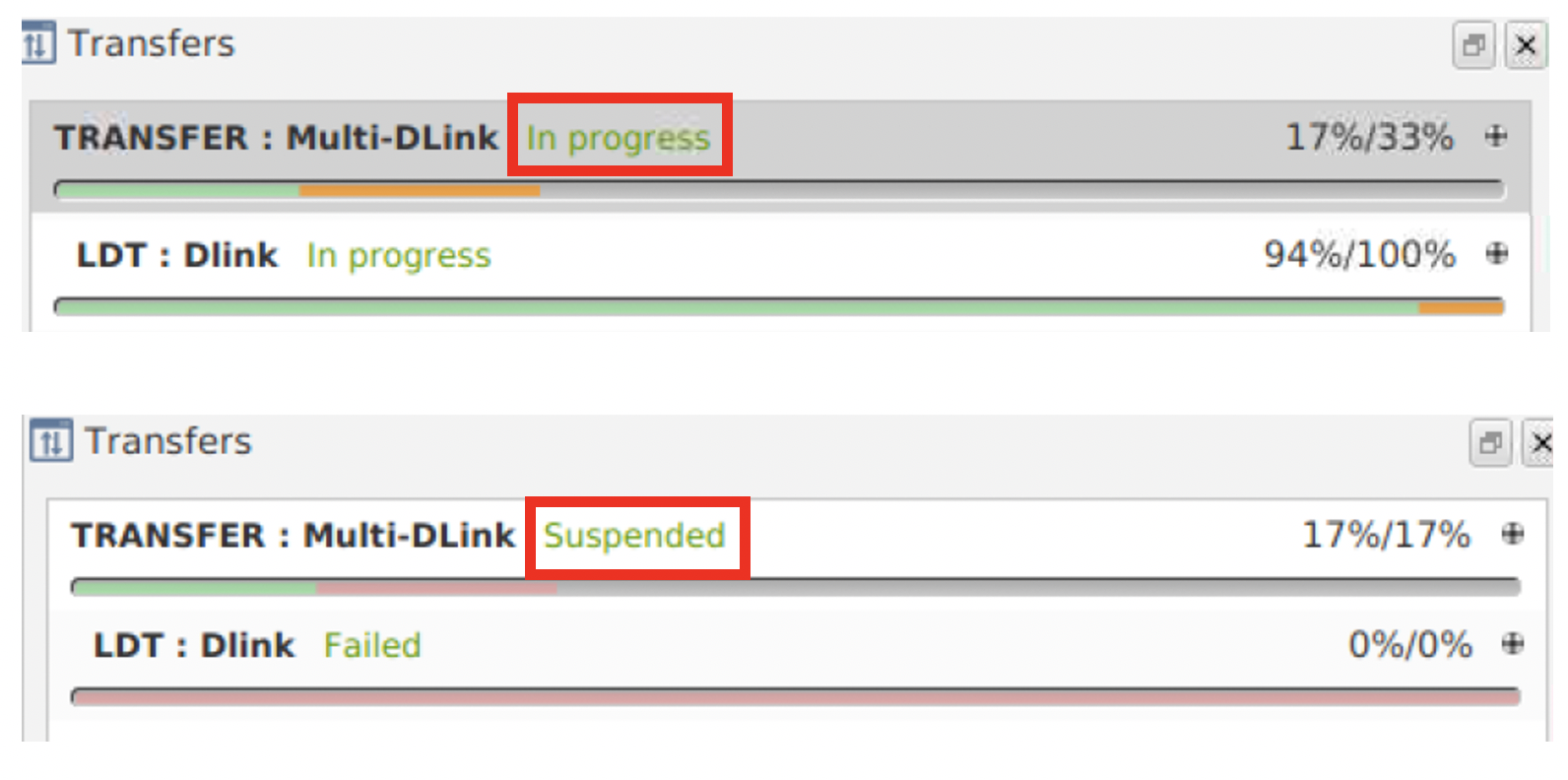
Figure 1 - Transfer Window during an LDT. Top: In progress transfer. Bottom: Suspended transfer.
D. Post-Pass Close-out
D.1.
When the Transfer Window in MCS indicates that the transfer has completed successfully (i.e. when 100/100% is observed in the “Multi D-link” tab, shortly after which the LDT will disappear from the Transfer Window), update the ‘LastPassInfo’ Sheet of ROW with the value of the
cdh.logging.XXXLogger.AbsRowsLoggedparameter corresponding to the downlinked data.
D.2.
The file saved with a temporary filename in Step C.3. should now be renamed to match the following format
[TYPE]_[YYYYMMDD]_[First Row]_[Last Row]_[AbsRowsLogged corresponding to Last Row],
where [First Row], [Last Row] and [AbsRowsLogged corresponding to Last Row] should be taken from ROW.
This file should then be move to ~/Desktop/DataFromSC.
D.3.
If health check data was downlinked during the pass, this data should now be reviewed, calling on other team members for input where necessary and using, e.g., Grafana. If science data was downlinked, the relevant science teams should be notified.
END OF PROCEDURE