EIR-OPS-002: Pre-Communication Pass Checklist
Objective
To prepare for a communication pass with EIRSAT-1.
Introduction
Using this procedure, the Operator will ensure they are fully prepared for the next communication pass with the satellite.
Procedure
A.1.
Establish what image (i.e.
platform.obc.OBC.currBootImage) and, if applicable, mode (i.e.mission.ModeManager.Mode) the satellite were operating in during the previous pass.If more recent information is available from the amateur radio community, determine this from their data.
A.2.
Using
core.OBT.uptimefrom the previous pass, roughly estimate whatuptimeis expected during the upcoming pass.Use this Google Sheet to help with the calculation if needed.
A.3.
Note the last HMAC TC sequence number used by MCS (see Figure 1 for details on accessing this parameter).
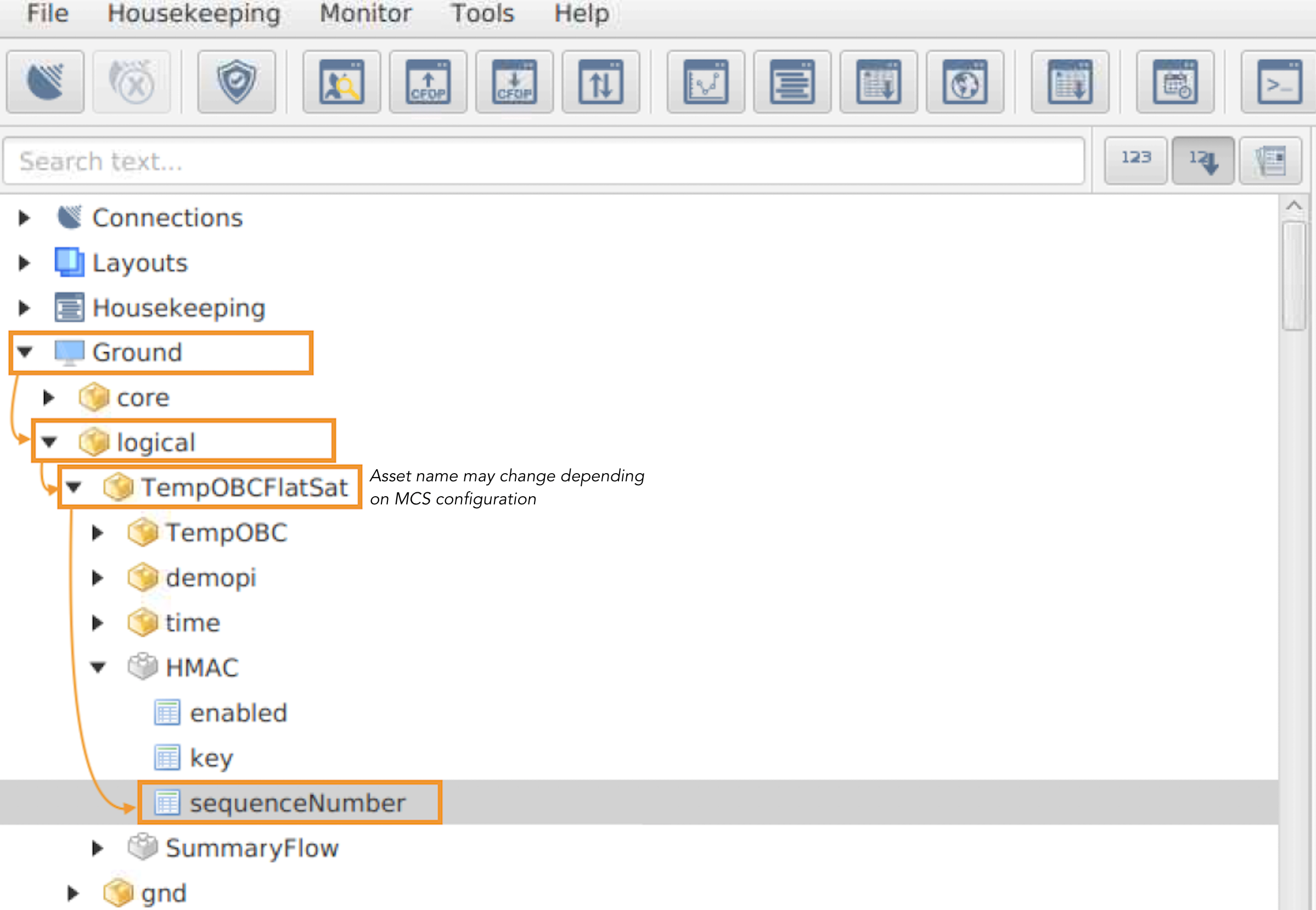
Figure 1 - Path to the MCS TC sequenceNumber, which is used by MCS to generate TCs with HMAC authentication framing.
The first action to take if no TM is received to TCs but a beacon is received is to compare this number in MCS with the value in the beacon.
The value in MCS can be in the range [value in beacon, value in beacon + 10].
Operators should be familiar with the EIR-OPS-034: NACK/Timeout/Unexpected TM procedure in case this or any other issues with 2-way communications are encountered.
Note
When taking note of the last HMAC TC sequence number used by MCS, account for the fact that the HMAC counter on MCS increases even if the spacecraft does not respond so it may be required to subtract the number of NACK-TCs at LOS from the current number.
Important
The HMAC TC sequence number is only relevant if TC authentication is enabled.
A.4.
Determine if a Large Data Transfer (LDT) was paused from a previous communication pass (refer to the Transfer Window on MCS).
If so, discuss with the team if this LDT should be resumed on the next pass.
A.5.
Determine if a new transfer should be set up, taking into consideration the procedure plans for the up-coming pass.
If a new LDT is to be set-up, prior to the pass discuss:
What data type(s) do you want to downlink?
What percentage of the pass time do you want to allocate to downlinking the different data types?
If constrained by the time, do you want to give priority to the newest or oldest rows of data?
This information will be used with the ROW Google Sheet during the pass to help the Operator to quickly determine what
First RowandLast Rowto use when downlinking data.To use ROW, information from previous passes must be provided and so, with above questions in mind, this Google Sheet should now be reviewed and filled-in as required.
Important
For maximum efficiency, transfers should only be requested one at a time.
A.6.
Communication passes are short! Ensure that the procedures to be followed in the upcoming communication pass have been reviewed so the Operator is familiar with the steps to be taken.
Note
If an LDT is to be started, also ensure to review the EIR-OPS-011: Downlink Data From Storage procedure!
A.7.
The following actions should also be taken with MCS:
If not already carried out today or if unusual behaviour was recently observed with the GUI, restart MCS.
Ensure the correct SCDB for the expected
currBootImageis the active SCDB in MCS.Prepare the required parameters/actions and, if applicable, prepare layouts.
Warning
If a new parameter is opened, do not incorrectly open the
cdh.telemetry.DataPoolversion of the parameter.Confirm (in ALL layouts to be used):
The Event Tab and Transfer Window are visible.
The Auto Scroll button is clicked on the Packet Monitor and the Event Console.
Ensure “Connected” is observed on the bottom right-hand corner of MCS.
A.8.
Finally, the Operators should have a clear understanding of their roles and responsibilities for the upcoming pass.
Prior to the pass, these should be agreed on with the other Operators on duty.
END OF PROCEDURE