EIR-OPS-025: Safe Mode Entered
Objective
To identify the most probable cause of the Safe Mode entry.
Introduction
Using this procedure, the Operator will downlink data from the spacecraft to determine the most likely cause of the spacecraft’s unexpected entry to Safe Mode. Identification of the most likely scenario that led to Safe Mode will allow the Operator to properly assess what further analysis/health checks should then performed before proceeding with nominal operations.
Procedure
This procedure contains the following sub-procedures:
Note
Communication with the spacecraft is required for Sections B, C and E.
Important
Following the Initial Checks, Section C (Downlinking Data) should be referred to for each communication pass. Data downlink should be the Operator’s priority during each pass while trying to establish the cause of the un-commanded mode change. The analysis detailed in Section D of this procedure should only be performed in parallel by other members of the team or outside of communication passes.
A. Raising the Safe Mode Alarm
A.1.
Ensure that the Senior Operations and/or Systems Teams have been alerted that the spacecraft has unexpectedly entered Safe Mode.
B. Initial Checks
Important
You are about to send the first TC of this procedure - Have you completed the EIR-OPS-003: Start a Communication Pass procedure? A Communication Pass must be started prior to carrying out the operations planned for the pass, even when in Safe Mode!
B.1.
To ensure that the automatic transition to Safe Mode occurred without error,
Getthemission.ModeManager.ExitErrorCountparameter.Ensure 0 is returned.
TC Details |
|
MCS Operation |
|
Action/Param Name |
|
Data Expected with TC |
No |
TM Details |
|
Data Expected from TC |
|
Data Size |
1 byte |
Data Info |
Error count from last mode exit |
Allowed Value(s) |
00 - FF (Hex) |
Expected Value(s) |
0 (i.e. no errors) |
B.2.
Also
Getthemission.ModeManager.EntryErrorCountparameter.Ensure 0 is returned.
TC Details |
|
MCS Operation |
|
Action/Param Name |
|
Data Expected with TC |
No |
TM Details |
|
Data Expected from TC |
|
Data Size |
1 byte |
Data Info |
Error count from last mode entry |
Allowed Value(s) |
00 - FF (Hex) |
Expected Value(s) |
0 (i.e. no errors) |
B.3.
Given the critical operational state of the spacecraft, to further confirm that all settings were correctly applied on entry to Safe Mode,
Gettheplatform.EPS.actualSwitchStatesparameter withFirst row= 0 andLast row= 9.Ensure that all 0s (excluding row 7/PDM 8) are returned.
Caution
The FSS is drawing parasitic power on row 7/PDM 8 of EPS.actualSwitchStates and so will always be returned as 1 (ON), even if the state of PDM8/Row7 of EPS.expectedSwitchStates is set to 0 (OFF).
TC Details |
|
MCS Operation |
|
Action/Param Name |
|
Data Expected with TC |
Yes |
Data Size |
2 bytes, 2 bytes |
Data Info |
|
Allowed Value(s) |
0-9, 0-9 |
Expected Value(s) |
0, 9 |
TM Details |
|
Data Expected from TC |
List of switch states ( + ACK ) |
Data Size |
List[0:10] of Booleans |
Data Info |
If all 0, all PDMs are off |
Allowed Value(s) |
0000000000 (all PDMs OFF) - 1111111111 (all PDMs ON) |
Expected Value(s) |
0000000100 (all PDMs OFF, except for the FSS PDM/PDM 8) |
B.4.
Getthe parameterplatform.ADCS.adcsModeStateto determine the current ADCS mode and state.Ensure 0x0000 (i.e. Standby Mode/Nadir State) is returned.
TC Details |
|
MCS Operation |
|
Action/Param Name |
|
Data Expected with TC |
No |
TM Details |
|
Data Expected from TC |
|
Data Size |
4 bytes |
Data Info |
The current mode (2 MSB) and state (2 LSB) of the ADCS |
Allowed Value(s) |
See tables below |
Expected Value(s) |
00000000 |
Where…
|
ADCS Mode |
|---|---|
0000 |
Standby (Default) |
0001 |
Detumble |
0002 |
Spin Stabilised |
5550 |
Test |
|
ADCS State |
|---|---|
0000 |
Nadir (Default) |
AAA8 |
Test |
C. Downlinking Data
Important
Ongoing LDTs should not be resumed as the spacecraft may have entered Safe Mode due to low power conditions. No unnecessary downlinks (e.g. of science data) should be conducted at this time.
C.1.
Following the Safe Mode entry, the
EventandHKdata logs should be given the highest priority for data downlink to best establish the main chain of events that led to the un-commanded mode change.However, the priority for data downlink should be re-assessed by the Operators between each pass following the analyses performed in Section D, as the analyses will likely reveal that a particular data type may be more relevant than another to fully establish the cause of the Safe Mode entry.
With the downlink priority for a given pass established, during the pass, downlink the data according to EIR-OPS-011: Downlink Data From Storage .
C.2.
If a communication pass is over proceed to Section D, however, for later passes and while the reason for Safe Mode is still being assessed, the Operator should return to this section and continue to downlink data from the above table as well as any additional data desired as a result of the analysis carried out in Section D.
D. Identifying the Cause (to be carried out between passes)
Figure 1 shows the primary chain of events that can lead to a Safe Mode entry. The steps provided in this section will allow the Operator to assess which one of these chains has most likely occurred.
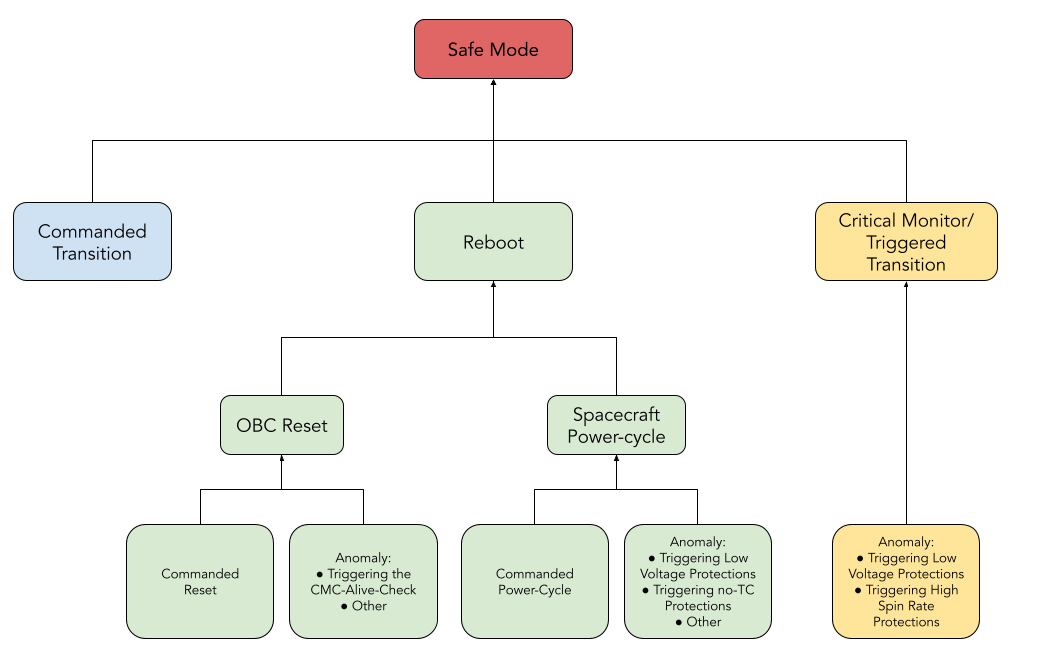
Figure 1. Primary chain of events that can lead to a Safe Mode entry.
COMMANDED?
D.1.
It is highly unlikely that the Operator would not know about commands sent to the spacecraft that would lead to Safe Mode. However, the possibility should still be ruled out.
Therefore, using the MCS/GS logs verify that the following TCs were not sent to the spacecraft since the mode was last as expected (i.e. not Safe Mode):
Invoke:mission.ModeManager.transitionToSafeModeInvoke:platform.obc.OBC.resetInvoke:platform.EPS.cycleBus
If any of these commands were sent to the spacecraft since the mode was last as expected (i.e. not Safe Mode), the Safe Mode transition was likely a result of the command(s).
REBOOT?
D.2.
Using the
core.OBT.uptimeparameter obtained during the EIR-OPS-003: Start a Communication Pass procedure (or from the downlinkedHKdata) , determine if a reboot has occurred since the last pass (i.e. determine if thecore.OBT.uptimeparameter reset to 0).
D.3.
If the
core.OBT.uptimeparameter HAS NOT RESET since the last pass, a reboot has not occurred so proceed to Step D.9.Else, if the parameter HAS RESET since the last pass, a reboot has occurred due to either an OBC reset or a full spacecraft power-cycle and so the steps immediately following this step should now be followed.
Tip
In the next sections the Operator will be advised to search the Event log for information on the Safe Mode transition, however, the Operator should note that a lot of this information may also be inferred from other downlinked data types (e.g. HK, TED, PASCAL, etc.).
REBOOT! WHY?
Warning
TC authentication is disabled at boot to reduce the risk of loosing communication with the spacecraft. Therefore, TC authentication is now disabled. The Operator should consider following the EIR-OPS-009: Enable TC Authentication procedure ASAP to re-enable TC authentication to prevent replay attacks.
D.4.
The above findings suggest that a reboot was a part of the events that led to this Safe Mode transition.
To confirm this and to determine whether the reboot was a result of an OBC reset or a full spacecraft power-cycle, first search the downlinked Event log data for the ‘SafeModeTrigger’ event.
The time at which this event was raised marks the time at which Safe Mode was entered.
D.5.
Around the time of this event/mode transition, also search the Event log for an ‘EPSInitialised’ event, which is raised when a full spacecraft power-cycle has occurred
D.6.
If an ‘EPSInitialised’ event IS NOT OBSERVED in the Event log around the time of the ‘SafeModeTrigger’ event, an OBC reset has occurred. In this case, the remaining steps in this procedure should not be taken, instead the EIR-OPS-027: Reboot Fault Analysis procedure should now be followed.
Else, if an ‘EPSInitialised’ event IS OBSERVED in the Event log around the time of the ‘SafeModeTrigger’ event, the Operator should proceed to the next step of this procedure.
D.7.
The Operator should now search the Event log between the last time at which the mode was as expected (i.e. not Safe Mode) and the time of the Safe Mode trigger for a ‘LowVoltageExceptionBatSafe’ event, which is raised when the battery voltage on the battery bus drops below 7.5 V.
Note
Multiple of the above event may be observed in the Event log while the battery bus voltage sits close to its 7.5 V Safe Mode trigger limit.
D.8.
If a ‘LowVoltageExceptionBatSafe’ event:
IS NOT OBSERVED, this Safe Mode entry has resulted from a full spacecraft power-cycle that is unrelated to low battery voltage levels. In this case, the remaining steps in this procedure should not be taken, instead EIR-OPS-027: Reboot Fault Analysis procedure should now be followed.
IS OBSERVED in the Event log prior to the ‘EPSInitialised’ event, it is possible that the battery continued to drain at a high rate after Safe Mode was entered and that the spacecraft was powered off for a period of time by the spacecraft’s low voltage protection function (which triggers when battery bus voltage is ~6.144 V). This should be checked using the downlinked HK data (i.e. check the
platform.BAT.batteryVoltage[2]orplatform.EPS.busVoltage[0]parameters following the Safe Mode trigger to determine if the battery depleted to ~6.144 V after the time of the Safe Mode trigger). In this case, the remaining steps in this procedure should not be taken, instead the EIR-OPS-026: Low Battery Fault Analysis procedure should now be followed.IS OBSERVED in the Event log but after the ‘EPSInitialised’ event, the 2 events are likely unrelated. In this case, both the EIR-OPS-026: Low Battery Fault Analysis and EIR-OPS-027: Reboot Fault Analysis procedures should now be followed to determine the reasons for both events and the cause of the Safe Mode entry.
CRITICALMONITOR EVENT! WHY?
D.9.
The above findings suggest that an event from the CriticalMonitor component has likely caused this entry to Safe Mode (because other than a command and an OBC reset/power-cycle, there is no other way to trigger Safe Mode).
To confirm this, first search the downlinked Event log data for the ‘SafeModeTrigger’ event.
The time at which this event was raised marks the time at which Safe Mode was entered.
D.10.
Around the time of this event/mode transition, also search the Event log for the following events:
‘LowVoltageExceptionBatSafe’, which is raised when the battery voltage on the battery bus drops below 7.5 V.
‘SpinRateVeryHighSafe’, which is raised when the average rotation rate from the gyros exceeds 30 degrees/second.
Note
Multiple of the above events may be observed in the Event log while the voltage and average rotation rate sit close to their respective Safe Mode trigger limits.
D.11.
If a ‘LowVoltageExceptionBatSafe’ event IS NOT OBSERVED, proceed to the next step of this procedure.
Else, if the event IS OBSERVED, Safe Mode has been triggered by an event from the low battery voltage CriticalMonitor check. As the most likely cause for this Safe Mode transition has now been identified, the remaining steps in this procedure are unnecessary, instead the EIR-OPS-026: Low Battery Fault Analysis procedure should now be followed.
D.12.
If a ‘SpinRateVeryHighSafe’ event IS NOT OBSERVED, proceed to the next step of this procedure.
Else, if the event IS OBSERVED, Safe Mode has been triggered by an event from the high spin rate CriticalMonitor check. As the most likely cause for this Safe Mode transition has now been identified, the remaining steps in this procedure are unnecessary, instead the EIR-OPS-028: High Rotation Rate Fault Analysis procedure should now be followed.
D.13.
If neither of the above events are observed in the Event log, some anomalous behaviour has led to this Safe Mode entry.
A POA should now be discussed in light of this information.
E. Resuming Nominal Operations
Warning
This section of the procedure should ONLY be carried out following the close-out of Section D and ONLY IF the decision has been made to transition from Safe Mode.
E.1.
Using procedures in this manual (see EIR-OPS-012: Set Up Nominal Operations ), the Operator should attempt to transition from Safe Mode and resume nominal operations (i.e. Nominal Mode with the experiment running and data logging on-going) once the anomaly investigation in Section D is complete.
END OF PROCEDURE