EIR-OPS-036: Downlink GRB Trigger Data
Objective
To downlink the contents of an on-board storage channel containing GMOD GRB trigger data.
Introduction
Using this procedure, the Operator will downlink multiple rows of data from a specific on-board storage channel that is storing GMOD trigger data.
Procedure
This procedure contains the following sub-procedures:
Note
Communication with the spacecraft is required for Sections B and C of this procedure.
A. Pre-Pass Preparations
A.1.
Using information from any data previously downlinked from channel ID = 32 (dec), the ‘GRBTriggTracker’ sheet of ROW should be populated.
A.2.
The Operators should take note of the channel ID of next GRB trigger to be downlinked. This ID will be in the first row of the ‘GRBTriggTracker’ sheet of ROW where Data Downlinked = No.
A.3.
Have the ‘RowsToDownlink’ sheet of ROW open before the pass begins as it will be used to determine the number of rows to downlink from the GRB trigger storage channel.
Tip
Prior to proceeding, ensure that the MCS Transfer Window is open so that the status of the LDT to be performed in the following sections can be monitored.
B. Data Downlink
B.1.
Querythe parametercore.storage.channelContentwithParameter index in block= channel ID from Step A.2.
TC Details |
|
MCS Operation |
|
Action/Param Name |
|
Data Expected with TC |
Yes |
Data Size |
2 bytes |
Data Info |
|
Allowed Value(s) |
1 - 87 (dec) |
TM Details |
|
Data Expected from TC |
|
Data Size |
4 bytes |
Data Info |
Number of rows in channel ID |
Allowed Value(s) |
0 - 65535 (dec) |
B.2.
In the ‘RowsToDownlink’ sheet of ROW , input the
numRowsobtained in Step B.1.
B.3.
Downlinkfrom thecore.storage.channelContentparameter with:The
Parameter index in block= channel ID from Step A.2, andThe
First rowandLast Rowfields to equal the values given by ROW (OLDEST data).
Tip
When Downlink is clicked, MCS will prompt the Operator for a filename. To facilitate starting the LDT promptly, provide a short, temporary filename (e.g. ‘HK’, ‘TED’, etc.). A filename extension is not required.
TC Details |
|
MCS Operation |
|
Action/Param Name |
|
Data Expected with TC |
Yes |
Data Size |
2 bytes; 2 bytes; 2 bytes |
Data Info |
|
Allowed Value(s) |
0001 - FFFF, 0000 - FFFF and 0000 - FFFF (Hex) |
TM Details |
|
Data Expected from TC |
Data ( + ACK ) |
Data Size |
n bytes, where n = size of requested data |
Data Info |
Requested data |
B.4.
Confirm from the Transfer Window in MCS that the LDT is now on-going.
Warning
LDTs can sometimes fail in an acceptable way, e.g. due to the on-board storage being ‘busy’ when the OBSW attempted to access the requested data. When a transfer is progressing successfully, the Transfer Window should state the the LDT is ‘In progress’ (see Figure 1). However, if a fail occurs and ‘Suspended’ is instead observed, select the LDT in the Transfer Window and click the ‘Resume’ button.
This may happen multiple times but should not happen so frequently that the transfer does not progress by some amount (%) in-between the attempts to resume the transfer. If the transfer persistently fails, do NOT continue with attempts to resume the LDT or with the remainder of the procedure until the Software and/or Systems Engineer have reviewed the issue.
This option to ‘resume’ a failed LDT is only applicable to multi-part LDTs (referred to as ‘Multi-DLink’ LDTs in MCS/Figure 1). Smaller downlinks that do not generate an associated Multi-DLink pane in MCS must be restarted from scratch.
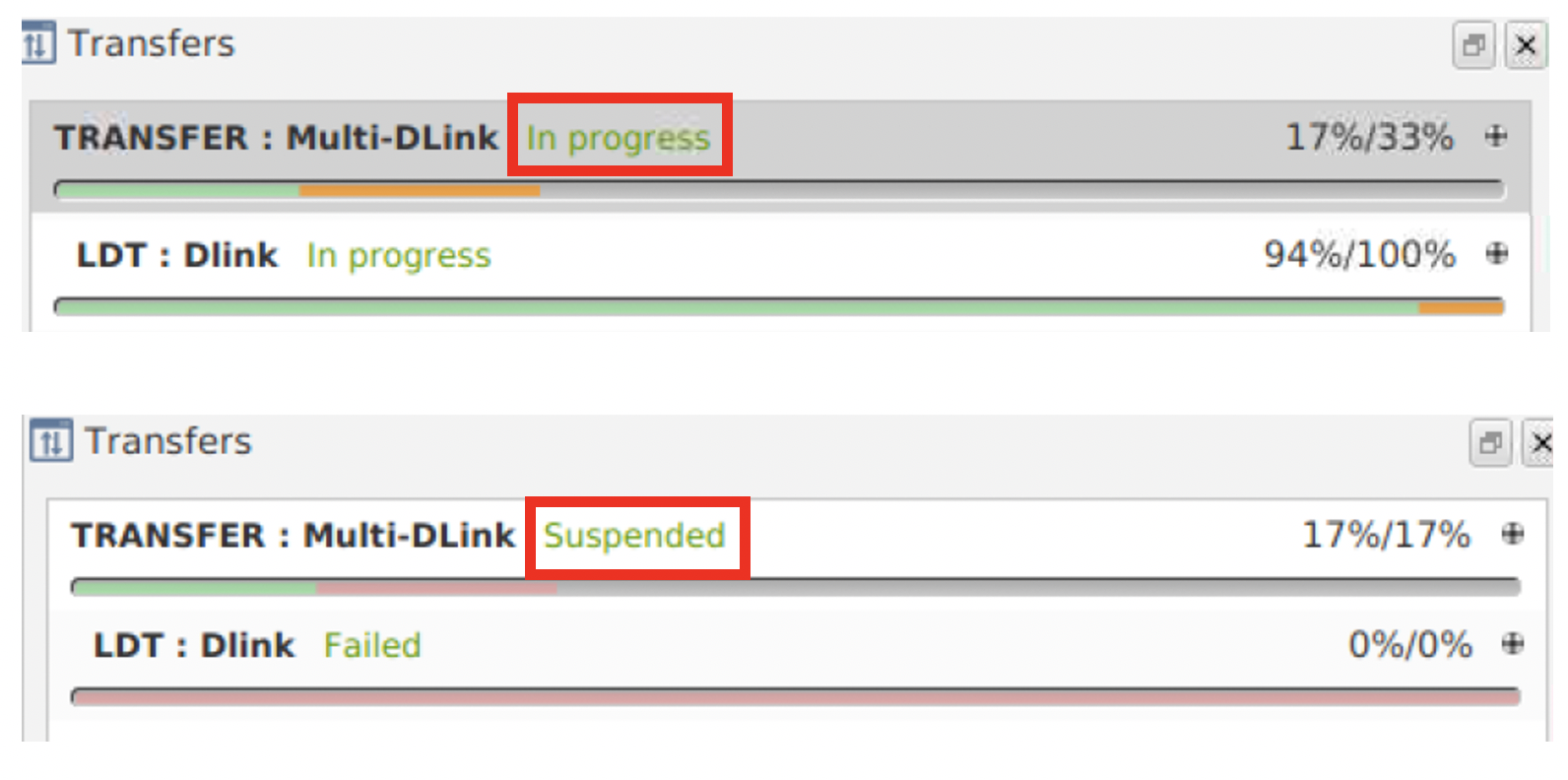
Figure 1 - Transfer Window during an LDT. Top: In progress transfer. Bottom: Suspended transfer.
B.5.
If all rows of data are downlinked from the channel, this channel should now be wiped.
To do this, follow Section C of EIR-OPS-013: Storage Channel Operations .
C. Post-Pass Close-out
C.1.
If a channel has been wiped:
Alternatively, if the channel has not yet been wiped as only some rows are currently downlinked, the ‘LastPassInfo’ sheet of ROW should be updated with the
Last rowused in the last successful downlink.
END OF PROCEDURE