EIR-OPS-007: Operational Mode Change
Objective
To determine and/or change the current Operational Mode of the spacecraft.
Introduction
Using this procedure, the Operator can determine EIRSAT-1’s current Operational Mode. The procedure also contains details on how to prompt a mode change via TC. EIRSAT-1’s Operational Modes are shown in Figure 1.
Note
Communication with the spacecraft is required throughout this procedure.
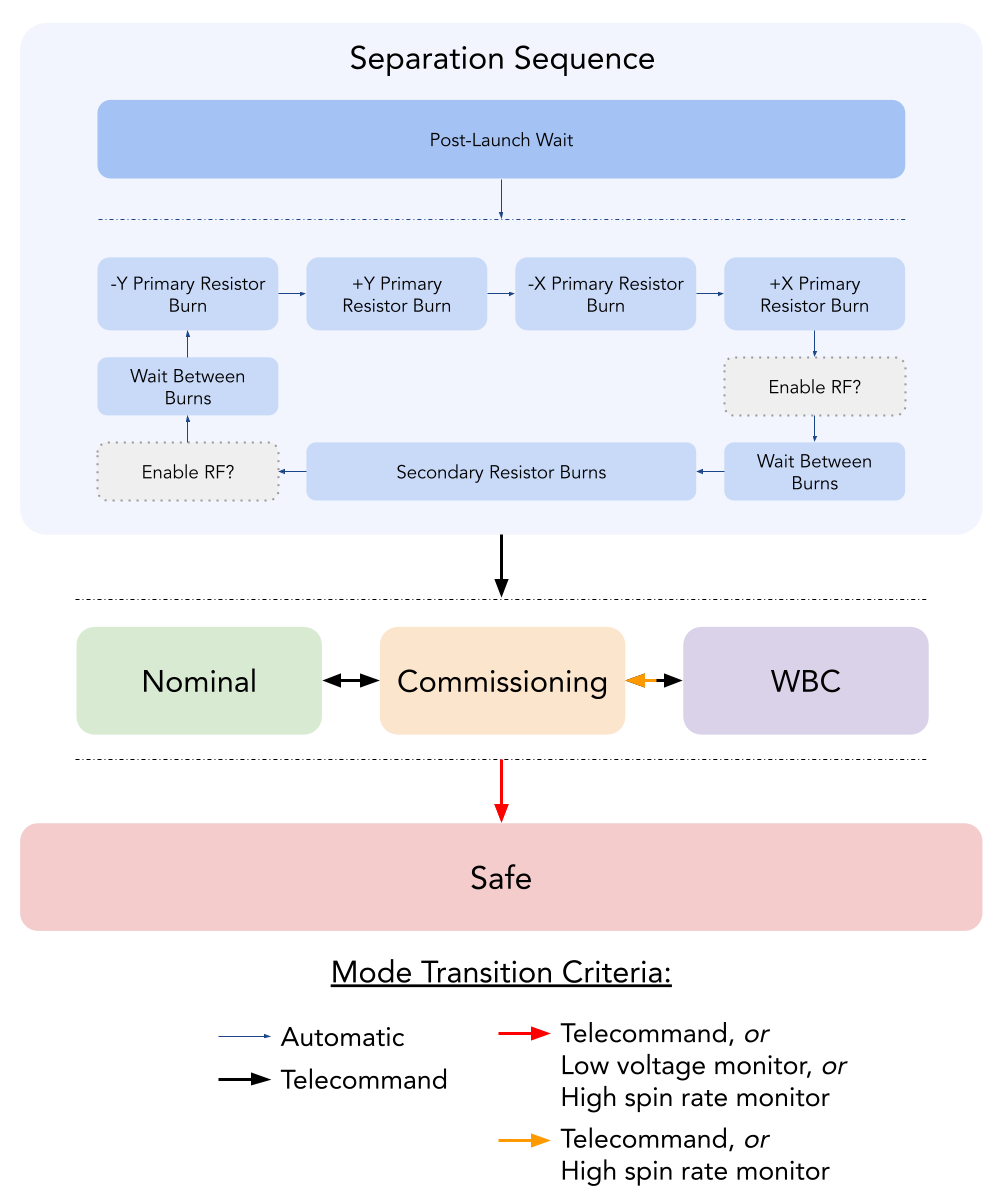
Figure 1 - EIRSAT-1’s Operational Modes.
Procedure
A. Configuring Mode Entry Settings
Important
You are about to send the first TC of this procedure - Have you completed the EIR-OPS-003: Start a Communication Pass procedure? A Communication Pass must be started prior to carrying out the operations planned for the pass. Don’t forget to set up the parameters/actions that will be used during the pass in MCS before the pass begins!
A.1.
If the Operator is not intending to transition to Nominal Mode as part of this procedure, proceed immediately to Section B.
Else,
Getthe parametermission.ModeManager.NominalEntryEPSSwStatesBitmap.Take note of the TM returned for use in the next step.
TC Details |
|
MCS Operation |
|
Action/Param Name |
|
Data Expected with TC |
No |
TM Details |
|
Data Expected from TC |
|
Data Size |
2 bytes |
Data Info |
A bitmap describing the switch states to be set for the 10 EPS PDMs |
Allowed Value(s) |
0000 - 03FF (Hex) |
A.2.
The TM returned in the previous step is a bitmap describing the PDM switch states that will be set by the OBC while transitioning to Nominal Mode, where the LSB = PDM 1
E.g. 0x3A4 / b1110100100, will turn on PDMs 3, 6, 8, 9 and 10.
The Operator should review this TM and ensure the desired PDMs will be powered on/off on entry to Nominal Mode.
If the value is already as desired, proceed to Section B.
Else,
Setthe parametermission.ModeManager.NominalEntryEPSSwStatesBitmapto the desired value now.
TC Details |
|
MCS Operation |
|
Action/Param Name |
|
Data Expected with TC |
Yes |
Data Size |
2 bytes |
Data Info |
A bitmap describing the switch states to be set for the 10 EPS PDMs |
Allowed Value(s) |
0000 - 03FF (Hex) |
TM Details |
|
Data Expected from TC |
No ( + ACK ) |
A.3.
Confirm the
Setin the previous step with aGet(i.e. confirm the value was set successfully).
B. Transitioning Modes
B.1.
To confirm which mode EIRSAT-1 is currently operating in,
Getthemission.ModeManager.Modeparameter.
TC Details |
|
MCS Operation |
|
Action/Param Name |
|
Data Expected with TC |
No |
TM Details |
|
Data Expected from TC |
|
Data Size |
1 byte |
Data Info |
Current Operational Mode of EIRSAT-1 |
Allowed Value(s) |
00 - 04 (see table below) |
Where…
|
Operational Mode |
|---|---|
00 |
Separation Sequence |
01 |
Commissioning |
02 |
Nominal |
03 |
WBC |
04 |
Safe |
B.2.
To transition to a new Operational Mode,
Invokethe applicablemission.ModeManager.transitionTo...action from the following list of actions…mission.ModeManager.transitionToSeparationSequenceMode,mission.ModeManager.transitionToCommissioningMode,mission.ModeManager.transitionToNominalMode,mission.ModeManager.transitionToWBCMode, ormission.ModeManager.transitionToSafeMode
Warning
Entering Safe Mode from Separation Sequence Mode is a prohibited transition.
TC Details |
|
MCS Operation |
|
Action/Param Name |
|
Data Expected with TC |
No |
TM Details |
|
Data Expected from TC |
No ( + ACK ) |
B.3.
To verify that the action was invoked successfully,
Getthemission.ModeManager.Modeparameter.
TC Details |
|
MCS Operation |
|
Action/Param Name |
|
Data Expected with TC |
No |
TM Details |
|
Data Expected from TC |
|
Data Size |
1 byte |
Data Info |
Current Operational Mode of EIRSAT-1 |
Allowed Value(s) |
00 - 04 (see table above) |
Expected Value(s) |
Mode transitioned to in Step B.2 |
B.4.
To assess whether the mode change occurred without error,
Getthemission.ModeManager.ExitErrorCountparameter.Ensure 0 is returned.
TC Details |
|
MCS Operation |
|
Action/Param Name |
|
Data Expected with TC |
No |
TM Details |
|
Data Expected from TC |
|
Data Size |
1 byte |
Data Info |
Error count from last mode exit |
Allowed Value(s) |
00 - FF (Hex) |
Expected Value(s) |
0 (i.e. no errors) |
B.5.
Also
Getthemission.ModeManager.EntryErrorCountparameter.Ensure 0 is returned.
TC Details |
|
MCS Operation |
|
Action/Param Name |
|
Data Expected with TC |
No |
TM Details |
|
Data Expected from TC |
|
Data Size |
1 byte |
Data Info |
Error count from last mode entry |
Allowed Value(s) |
00 - FF (Hex) |
Expected Value(s) |
0 (i.e. no errors) |
B.6.
If further verification of the current Operational Mode is desired (e.g. following a first-time mode transition),
Getthe parameters from the below table.Where expected/default values are provided, compare them to their expected values for each of the Operational Modes.
Note
In the below table, where cells have been left blank, there is no default value applied to that parameter on entry to that mode. NominalEntryEPSSwStatesBitmap is configurable via TC.
|
Separation Seq. (00) |
Commissioning (01) |
Nominal (02) |
WBC (03) |
Safe (04) |
|---|---|---|---|---|---|
|
0x200 (PDM 10 On) |
|
0000 (All PDMs Off) |
||
|
00000000 (Standby) |
00000000 (Standby) |
0x5550AAA8 (Test) |
00000000 (Standby) |
|
|
0 (Disabled) |
1 (Enabled) |
1 (Enabled) |
1 (Enabled) |
0 (Disabled) |
|
1 (Enabled) |
||||
|
0x00 - 0x09 (SS on-going) |
0x42 (Finished State) |
0x42 (Finished State) |
0x42 (Finished State) |
0x42 (Finished State) |
|
0 (Disabled) |
0 (Disabled) |
|||
|
0 (Disabled) |
1 (Enabled) |
0 (Disabled) |
||
|
0 (Disabled) |
1 (Enabled) |
0 (Disabled) |
END OF PROCEDURE