EIR-OPS-006.6: GMOD Health Check
Objective
To assess the health of the GMOD payload following launch.
Introduction
This procedure will perform a health check on the GMOD payload by verifying some basic functionality performs as expected.
Procedure
This procedure contains a number of sub-procedures as follows:
Note
A communication window is required for each of these sub-procedures.
A. Power On and Initial Checks
Important
You are about to send the first TC of this procedure - Have you completed the EIR-OPS-003: Start a Communication Pass procedure? A Communication Pass must be started prior to carrying out the operations planned for the pass. Don’t forget to open and set up the parameters/actions that will be used during the pass in MCS before the pass begins!
A.1.
Invokethe actionplatform.EPS.TurnOnGMODto turn ON GMOD.
TC Details |
|
MCS Operation |
|
Action/Param Name |
|
Data Expected with TC |
No |
TM Details |
|
Data Expected from TC |
No ( + ACK ) |
A.2.
Getthe parameterplatform.EPS.actualSwitchStateswithFirst row= 0 andLast row= 9 to assess whether GMOD is now on.Ensure that PDMs 3, 6 and 9/rows 2, 5 and 8 are ON/1.
Warning
PDM 8 is drawing parasitic power. Therefore, when you Get the platform.EPS.actualSwitchStates parameter it will always read as ON/1 even when it is powered OFF.
TC Details |
|
MCS Operation |
|
Action/Param Name |
|
Data Expected with TC |
|
Data Size |
2 bytes, 2 bytes |
Data Info |
The first and last rows/indexes of the parameter to get |
Allowed Value(s) |
0 - 9, 0 - 9 |
Expected Value(s) |
0, 9 |
TM Details |
|
Data Expected from TC |
|
Data Size |
List[0:9] of booleans |
Data Info |
If |
Allowed Value(s) |
0,0,0,0,0,0,0,0,0,0 (all OFF) - 1,1,1,1,1,1,1,1,1,1 (all ON) |
Expected Value(s) |
X,X,1,X,X,1,X,X,1,X (PDMs 3, 6 + 9 = 1. Other PDMs may be 0 or 1) |
A.3.
Getthe parameterpayload.GMOD.FirmwareVersionto further verify that GMOD is now on.Ensure the expected firmware version (i.e. version of firmware programmed onto the MSP during pre-launch preparations) is returned.
TC Details |
|
MCS Operation |
|
Action/Param Name |
|
Data Expected with TC |
No |
TM Details |
|
Data Expected from TC |
|
Data Size |
2 bytes |
Data Info |
Version of the firmware currently running on the GMOD MSP |
Allowed Value(s) |
0000 - FFFE |
Expected Value(s) |
Version of firmware programmed onto the MSP during pre-launch prep. |
A.4.
Getthe parameterpayload.GMOD.GMODModeto assess whether GMOD is operating in the expected mode following power on.Ensure Idle Mode/1 is returned.
TC Details |
|
MCS Operation |
|
Action/Param Name |
|
Data Expected with TC |
No |
TM Details |
|
Data Expected from TC |
|
Data Size |
Int4 |
Data Info |
Current operational mode of GMOD |
Allowed Value(s) |
1 - 5 |
Expected Value |
1 |
Where…
|
Mode |
|---|---|
1 |
Idle |
2 |
Experiment |
3 |
CPLD Programme |
4 |
Safe |
5 |
Experiment16 |
A.5.
Getthe parameterpayload.GMOD.ResetCounterto determine the number of times the GMOD payload has reset since the MSP was last programmed.Assess whether the value is as expected given the number of MSP power ONs since pre-launch preparations/programming.
TC Details |
|
MCS Operation |
|
Action/Param Name |
|
Data Expected with TC |
No |
TM Details |
|
Data Expected from TC |
|
Data Size |
1 byte |
Data Info |
Number of resets since the firmware was last programmed |
Allowed Value(s) |
0 - 127 |
A.6.
Getthe parameterpayload.GMOD.LastResetTypeto determine the most recent type(s) of GMOD reset(s) that have occurred.Continue to get this parameter until 0 is returned.
TC Details |
|
MCS Operation |
|
Action/Param Name |
|
Data Expected with TC |
No |
TM Details |
|
Data Expected from TC |
|
Data Size |
1 byte |
Data Info |
Last GMOD reset type(s) |
Allowed Value(s) |
00 - 2E |
Where…
|
Reset Type |
|---|---|
02 |
Brownout |
04 |
Unknown |
06 |
SW reboot |
14 |
SW reboot |
16 |
Watchdog reset |
B. Bias PSU Checks
B.1.
Getthe parameterpayload.GMOD.biasOffsetEnable.Ensure 0 is returned as
biasOffsetEnableshould be 0/disabled at this point in the mission.
TC Details |
|
MCS Operation |
|
Action/Param Name |
|
Data Expected with TC |
No |
TM Details |
|
Data Expected from TC |
|
Data Size |
Boolean |
Data Info |
Bias Offset is Disabled (0) or Enabled (1) |
Allowed Value(s) |
0, 1 |
Expected Value(s) |
0 |
B.2.
Setthe parameterpayload.GMOD.BiasOffsetValueto 0999 (hex).
TC Details |
|
MCS Operation |
|
Action/Param Name |
|
Data Expected with TC |
|
Data Size |
2 bytes |
Data Info |
Bias Offset Value |
Allowed Value(s) |
0000 - 0FFF (hex) |
Expected Value(s) |
0999 (hex) |
TM Details |
|
Data Expected from TC |
No ( + ACK ) |
B.3.
Confirm the
Setin the previous step with aGet(i.e. confirm the value was set successfully).
B.4.
Setthe parameterpayload.GMOD.biasOffsetEnableto 1 (i.e. enabled).
TC Details |
|
MCS Operation |
|
Action/Param Name |
|
Data Expected with TC |
|
Data Size |
Boolean |
Data Info |
Bias Offset is Disabled (0) or Enabled (1) |
Allowed Value(s) |
0, 1 |
Expected Value(s) |
1 |
TM Details |
|
Data Expected from TC |
No ( + ACK ) |
B.5.
Confirm the
Setin the previous step with aGet(i.e. confirm the value was set successfully).
B.6.
Getthe parameterpayload.GMOD.BiasOffsetVoltage.Take note of the value for comparison with TM in a later step.
TC Details |
|
MCS Operation |
|
Action/Param Name |
|
Data Expected with TC |
No |
TM Details |
|
Data Expected from TC |
|
Data Size |
2 bytes |
Data Info |
ADC value connected to DACB output |
Allowed Value(s) |
0000 - 0FFF |
B.7.
Setthe parameterpayload.GMOD.boostConverterEnableto 1 (i.e. enabled).
TC Details |
|
MCS Operation |
|
Action/Param Name |
|
Data Expected with TC |
|
Data Size |
Boolean |
Data Info |
Boost Converter is Disabled (0) or Enabled (1) |
Allowed Value(s) |
0, 1 |
Expected Value(s) |
1 |
TM Details |
|
Data Expected from TC |
No ( + ACK ) |
B.8.
Confirm the
Setin the previous step with aGet(i.e. confirm the value was set successfully).
B.9.
Getthe parameterpayload.GMOD.BiasVoltage.Take note of the value for comparison with TM in a later step.
TC Details |
|
MCS Operation |
|
Action/Param Name |
|
Data Expected with TC |
No |
TM Details |
|
Data Expected from TC |
|
Data Size |
2 bytes |
Data Info |
ADC values connected to bias voltage |
Allowed Value(s) |
0000 - 0FFF |
B.10.
Setthe parameterpayload.GMOD.BiasOffsetValueto 0666 (hex).
TC Details |
|
MCS Operation |
|
Action/Param Name |
|
Data Expected with TC |
|
Data Size |
2 bytes |
Data Info |
Bias Offset Value |
Allowed Value(s) |
0000 - 0FFF (hex) |
Expected Value(s) |
0666 (hex) |
TM Details |
|
Data Expected from TC |
No ( + ACK ) |
B.11.
Confirm the
Setin the previous step with aGet(i.e. confirm the value was set successfully).
B.12.
Getthe parameterpayload.GMOD.BiasOffsetVoltage.Ensure the TM has changed compared to the TM from Step B.6.
TC Details |
|
MCS Operation |
|
Action/Param Name |
|
Data Expected with TC |
No |
TM Details |
|
Data Expected from TC |
|
Data Size |
2 bytes |
Data Info |
ADC value connected to DACB output |
Allowed Value(s) |
0000 - 0FFF |
B.13.
Getthe parameterpayload.GMOD.BiasVoltage.Ensure the TM has changed compared to the TM from Step B.9.
TC Details |
|
MCS Operation |
|
Action/Param Name |
|
Data Expected with TC |
No |
TM Details |
|
Data Expected from TC |
|
Data Size |
2 bytes |
Data Info |
ADC values connected to bias voltage |
Allowed Value(s) |
0000 - 0FFF |
B.14.
Setthe parameterpayload.GMOD.boostConverterEnableto 0 (i.e. disabled).
TC Details |
|
MCS Operation |
|
Action/Param Name |
|
Data Expected with TC |
|
Data Size |
Boolean |
Data Info |
Boost Converter is Disabled (0) or Enabled (1) |
Allowed Value(s) |
0, 1 |
Expected Value(s) |
0 |
TM Details |
|
Data Expected from TC |
No ( + ACK ) |
B.15.
Confirm the
Setin the previous step with aGet(i.e. confirm the value was set successfully).
B.16.
Getthe parameterpayload.GMOD.BiasVoltage.Ensure the TM has changed compared to the TM from Steps B.9 and B.13.
TC Details |
|
MCS Operation |
|
Action/Param Name |
|
Data Expected with TC |
No |
TM Details |
|
Data Expected from TC |
|
Data Size |
2 bytes |
Data Info |
ADC values connected to bias voltage |
Allowed Value(s) |
0000 - 0FFF |
B.17.
Setthe parameterpayload.GMOD.biasOffsetEnableto 0 (i.e. disabled).
TC Details |
|
MCS Operation |
|
Action/Param Name |
|
Data Expected with TC |
|
Data Size |
Boolean |
Data Info |
Bias Offset is Disabled (0) or Enabled (1) |
Allowed Value(s) |
0, 1 |
Expected Value(s) |
0 |
TM Details |
|
Data Expected from TC |
No ( + ACK ) |
B.18.
Confirm the
Setin the previous step with aGet(i.e. confirm the value was set successfully).
B.19.
Getthe parameterpayload.GMOD.BiasOffsetVoltage.Ensure the TM has changed compared to the TM from Steps B.6 and B.12.
TC Details |
|
MCS Operation |
|
Action/Param Name |
|
Data Expected with TC |
No |
TM Details |
|
Data Expected from TC |
|
Data Size |
2 bytes |
Data Info |
ADC value connected to DACB output |
Allowed Value(s) |
0000 - 0FFF |
C. Basic Streaming Data Test
C.1.
Getthepayload.GMOD.SyncTimeStatusparameter which indicates whether syncing of GMOD’s time from the OBC’s time is still in progress (0), a success (1), a failure (2 or 7) or yet to be synced (3).Ensure 3 (i.e. the initialisation value) is returned.
TC Details |
|
MCS Operation |
|
Action/Param Name |
|
Data Expected with TC |
No |
TM Details |
|
Data Expected from TC |
|
Data Size |
bit3 |
Data Info |
Status of time synchronisation between GMOD and OBC |
Allowed Value(s) |
0, 1, 2, 3, 7 |
Expected Value |
3 |
C.2.
Getthepayload.GMOD.MSPCoarseTimeparameter which returns the MSP’s current coarse time value.
TC Details |
|
MCS Operation |
|
Action/Param Name |
|
Data Expected with TC |
No |
TM Details |
|
Data Expected from TC |
|
Data Size |
4 bytes |
Data Info |
Coarse time counter from MSP |
Allowed Value(s) |
0 00000000 - FFFFFFFF (hex) |
Expected Value |
> 0 |
C.3.
Invokethepayload.GMOD.SyncTimeaction which synchronises GMOD’s coarse time clock with the OBC’s time.
TC Details |
|
MCS Operation |
|
Action/Param Name |
|
Data Expected with TC |
No |
TM Details |
|
Data Expected from TC |
No ( + ACK ) |
C.4.
Getthepayload.GMOD.SyncTimeStatusparameter which indicates whether syncing of GMOD’s time from the OBC’s time is still in progress (0), a success (1), a failure (2 or 7) or yet to be synced (3).Ensure 1 (i.e. the success value) is returned.
TC Details |
|
MCS Operation |
|
Action/Param Name |
|
Data Expected with TC |
No |
TM Details |
|
Data Expected from TC |
|
Data Size |
bit3 |
Data Info |
Status of time synchronisation between GMOD and OBC |
Allowed Value(s) |
0, 1, 2, 3, 7 |
Expected Value |
1 |
C.5.
Getthepayload.GMOD.MSPCoarseTimeparameter which returns the MSP’s current coarse time value.Ensure the returned value is much larger than the value returned in Step C.2, indicating that GMOD’s time is now consistent with the OBC’s.
TC Details |
|
MCS Operation |
|
Action/Param Name |
|
Data Expected with TC |
No |
TM Details |
|
Data Expected from TC |
|
Data Size |
4 bytes |
Data Info |
Coarse time counter from MSP |
Allowed Value(s) |
00000000 - FFFFFFFF (hex) |
Expected Value |
Larger than the value returned in Step C.2 |
C.6.
Getthepayload.GMOD.BaudRateSetStatusparameter which indicates whether setting the MSP baud rate was successful.Ensure 3 (i.e. the initialisation value) is returned.
TC Details |
|
MCS Operation |
|
Action/Param Name |
|
Data Expected with TC |
No |
TM Details |
|
Data Expected from TC |
|
Data Size |
bit3 |
Data Info |
Status of setting MSP baud rate |
Allowed Value(s) |
0 (in progress), 1 (success), 2 (failure), 3 (init) |
Expected Value |
3 |
C.7.
Invokethepayload.GMOD.MSPBaudRateaction with action argument = 01F400 (hex), which corresponds to a baud rate of 128000 (dec), to set the serial baud rate at which GMOD transfers data over to the OBC.
TC Details |
|
MCS Operation |
|
Action/Param Name |
|
Data Expected with TC |
|
Data Size |
3 bytes |
Data Info |
Baud rate for serial communication |
Allowed Value(s) |
000000 - FFFFFF (hex) |
Expected Value(s) |
01F400 (hex) |
TM Details |
|
Data Expected from TC |
No ( + ACK ) |
C.8.
Getthepayload.GMOD.BaudRateSetStatusparameter which indicates whether setting the MSP baud rate was successful.Ensure 1 (i.e. the success value) is returned.
TC Details |
|
MCS Operation |
|
Action/Param Name |
|
Data Expected with TC |
No |
TM Details |
|
Data Expected from TC |
|
Data Size |
bit3 |
Data Info |
Status of setting MSP baud rate |
Allowed Value(s) |
0 (in progress), 1 (success), 2 (failure), 3 (init) |
Expected Value |
1 |
C.9.
Getthe parameterpayload.GMOD.RegErrStatusto read the value of the ERR_O pin on the ASIC, which indicates if there are parity errors in registers.
Note
The value of this parameter should be roughly noted for later comparison with the same parameter following writing the registers to SIPHRA (i.e. Step C.16). The actual value may be gibberish at this time.
TC Details |
|
MCS Operation |
|
Action/Param Name |
|
Data Expected with TC |
No |
TM Details |
|
Data Expected from TC |
|
Data Size |
bit2 |
Data Info |
Value of the ERR_O pin on the ASIC |
Allowed Value(s) |
0 - 1 |
C.10.
Getthe parameterpayload.GMOD.ReadRegErrRegto read the individual register parity error statuses.
Note
The value of this parameter should be roughly noted for later comparison with the same parameter following writing the registers to SIPHRA (i.e. Step C.17). The actual value may be gibberish at this time.
TC Details |
|
MCS Operation |
|
Action/Param Name |
|
Data Expected with TC |
No |
TM Details |
|
Data Expected from TC |
|
Data Size |
4 bytes |
Data Info |
28-bit bitmap of boolean parity errors |
Allowed Value(s) |
00000000 - 0FFFFFFF |
C.11.
Getthe parameterpayload.GMOD.InitGMODConstantCurrValueto assess the DACA value that controls the MBias current.Ensure that 0862 (hex) is returned.
TC Details |
|
MCS Operation |
|
Action/Param Name |
|
Data Expected with TC |
No |
TM Details |
|
Data Expected from TC |
|
Data Size |
2 bytes |
Data Info |
Initialisation value for GMOD constant current |
Allowed Value(s) |
0000 - FFFF (hex) |
Expected Value |
0862 (hex) |
C.12.
Downlinkthe SIPHRA registers to be set using the parameterpayload.GMOD.InitASICRegBufferwithFirst row= 0 andLast row= 27.Confirm the contents of the downliked file match the image below.
TC Details |
|
MCS Operation |
|
Action/Param Name |
|
Data Expected with TC |
|
Data Size |
2 bytes, 2 bytes |
Data Info |
The first and last rows/indexes of the parameter to get |
Allowed Value(s) |
0 - 27, 0 - 27 (dec) |
Expected Value(s) |
0, 27 (dec) |
TM Details |
|
Data Expected from TC |
|
Data Size |
112 bytes |
Data Info |
ASIC register values to be set as part of the |
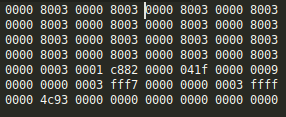
Figure 1 - Expected values for GMOD.InitASICRegBuffer
C.13.
Invokethe actionpayload.GMOD.InitialiseGMOD.
TC Details |
|
MCS Operation |
|
Action/Param Name |
|
Data Expected with TC |
No |
TM Details |
|
Data Expected from TC |
No ( + ACK ) |
Note
Currently this function: 1) Sets the ConstantCurrValue parameter (to the InitGMODConstantCurrValue parameter), 2) Sets the ConstantCurrEnable parameter to TRUE, 3) Toggles the ASICResetPin OFF and then ON, and 4) Writes the InitASICRegBuffer data to the ASIC reg table on the GMOD MSP. Each of these steps will only proceed if the previous step succeeded.
C.14.
Invokethe actionpayload.GMOD.writeRegToSIPHRAto write the contents of the ASIC register table on the MSP to the SIPHRA registers.
TC Details |
|
MCS Operation |
|
Action/Param Name |
|
Data Expected with TC |
No |
TM Details |
|
Data Expected from TC |
No ( + ACK ) |
C.15.
Getthe parameterpayload.GMOD.WriteRegStatusto confirm that the writes to SIPHRA were successful.Ensure 1 (i.e. success) is returned.
TC Details |
|
MCS Operation |
|
Action/Param Name |
|
Data Expected with TC |
No |
TM Details |
|
Data Expected from TC |
|
Data Size |
bit3 |
Data Info |
Successful = 1, In Progress = 0, Failed = 2 |
Allowed Value(s) |
0, 1, 2 |
Expected Value |
1 |
C.16.
Getthe parameterpayload.GMOD.RegErrStatusto read the value of the ERR_O pin on the ASIC, which indicates if there are parity errors in registers.Ensure 0 is returned (i.e. ensure the parameter has updated since Step C.9).
TC Details |
|
MCS Operation |
|
Action/Param Name |
|
Data Expected with TC |
No |
TM Details |
|
Data Expected from TC |
|
Data Size |
bit2 |
Data Info |
Value of the ERR_O pin on the ASIC |
Allowed Value(s) |
0, 1 |
Expected Value |
0 |
C.17.
Getthe parameterpayload.GMOD.ReadRegErrRegto read the individual register parity error statuses.Ensure all 0s are returned (i.e. ensure the parameter has updated since Step C.10).
TC Details |
|
MCS Operation |
|
Action/Param Name |
|
Data Expected with TC |
No |
TM Details |
|
Data Expected from TC |
|
Data Size |
4 bytes |
Data Info |
28-bit bitmap of boolean parity errors |
Allowed Value(s) |
00000000 - 0FFFFFFF (hex) |
Expected Value |
00000000 |
C.18.
Setthe parameterpayload.GMOD.BiasOffsetValueto 08CC (hex).
TC Details |
|
MCS Operation |
|
Action/Param Name |
|
Data Expected with TC |
|
Data Size |
2 bytes |
Data Info |
Bias Offset Value |
Allowed Value(s) |
0000 - 0FFF (hex) |
Expected Value(s) |
08CC (hex) |
TM Details |
|
Data Expected from TC |
No ( + ACK ) |
C.19.
Confirm the
Setin the previous step with aGet(i.e. confirm the value was set successfully).
C.20.
Setthe parameterpayload.GMOD.boostConverterEnableto 1 (i.e. enabled).
TC Details |
|
MCS Operation |
|
Action/Param Name |
|
Data Expected with TC |
|
Data Size |
Boolean |
Data Info |
Boost Converter is Disabled (0) or Enabled (1) |
Allowed Value(s) |
0, 1 |
Expected Value(s) |
1 |
TM Details |
|
Data Expected from TC |
No ( + ACK ) |
C.21.
Confirm the
Setin the previous step with aGet(i.e. confirm the value was set successfully).
C.22.
Setthe parameterpayload.GMOD.biasOffsetEnableto 1 (i.e. enabled).
TC Details |
|
MCS Operation |
|
Action/Param Name |
|
Data Expected with TC |
|
Data Size |
Boolean |
Data Info |
Bias Offset is Disabled (0) or Enabled (1) |
Allowed Value(s) |
0, 1 |
Expected Value(s) |
1 |
TM Details |
|
Data Expected from TC |
No ( + ACK ) |
C.23.
Confirm the
Setin the previous step with aGet(i.e. confirm the value was set successfully).
C.24.
Getthe parameterpayload.GMOD.GMODModeto assess what mode GMOD is operating in.
TC Details |
|
MCS Operation |
|
Action/Param Name |
|
Data Expected with TC |
No |
TM Details |
|
Data Expected from TC |
|
Data Size |
Int4 |
Data Info |
Current operational mode of GMOD |
Allowed Value(s) |
1 - 5 |
Where…
|
Mode |
|---|---|
1 |
Idle |
2 |
Experiment |
3 |
CPLD Programme |
4 |
Safe |
5 |
Experiment16 |
C.25.
If GMOD is not operating in Experiment Mode (i.e. if
GMODMode!= 02),SettheGMODModeparameter to 2 now.
TC Details |
|
MCS Operation |
|
Action/Param Name |
|
Data Expected with TC |
Yes |
Data Size |
Int4 |
Data Info |
Mode of GMOD |
Allowed Value(s) |
01, 02, 03, 04, 05 |
Expected Value(s) |
02 |
TM Details |
|
Data Expected from TC |
No ( + ACK ) |
C.26.
Confirm the
Setin the previous step with aGet(i.e. confirm the value was set successfully).
C.27.
Getthe parameterpayload.GMOD.LastPageSumAddrseveral times, with ~3 seconds between each TC, to read the memory address of the last summed channel TTE page stored to GMOD’s flash memory.Ensure the parameter value is changing, which confirms that GMOD is now generating data.
TC Details |
|
MCS Operation |
|
Action/Param Name |
|
Data Expected with TC |
No |
TM Details |
|
Data Expected from TC |
|
Data Size |
3 bytes |
Data Info |
Memory address for the last stored sum channel TTE page |
Allowed Value |
000000 - 007FFF (hex) |
Expected Value(s) |
Changing between TCs |
C.28.
Querythe parametercore.Storage.channelContentwithParameter Index in Blockset to 25 (dec).Ensure that 0 (rows) is returned.
TC Details |
|
MCS Operation |
|
Action/Param Name |
|
Data Expected with TC |
|
Data Size |
4 bytes |
Data Info |
Channel ID |
Allowed Value(s) |
1 - 88 (dec) |
Expected Value(s) |
25 (dec) |
TM Details |
|
Data Expected from TC |
Number of rows in GMOD Sum TTE storage channel ( + ACK ) |
Data Size |
4 bytes |
Data Info |
Number of rows in GMOD Sum TTE storage channel |
Allowed Value |
0 - 65535 (dec) |
Expected Value(s) |
0 |
C.29.
Invokethe actionpayload.GMOD.pageSendwith the action argument set as 0.Then
Getthe parameterLastPageSumAddrRx.Ensure the TM returned matches the memory address of the page just requested via
pageSend.Repeat the above bullet points 15 times, each time incrementing the action argument by 1.
This will result in 16 pages (i.e. a sector) being sent to the OBC for storage.
TC Details |
|
MCS Operation |
|
Action/Param Name |
|
Data Expected with TC |
Yes |
Data Size |
raw 2 |
Data Info |
|
Allowed Value(s) |
0 - 65535 (dec) |
Expected Value(s) |
0,1,2,3,4,5,6,7,8,9,10,11,12,13,14,15 (dec) |
TM Details |
|
Data Expected from TC |
No ( + ACK ) |
TC Details |
|
MCS Operation |
|
Action/Param Name |
|
Data Expected with TC |
No |
TM Details |
|
Data Expected from TC |
|
Data Size |
uint16 |
Data Info |
Updates with the memory address of the last summed channel TTE page received by the OBC from the MSP. |
Allowed Value |
000000 - 007FFF (hex) |
Expected Value(s) |
Increasing between each TC, from 0 - 15 (dec) |
C.30.
Again,
Querythe parametercore.Storage.channelContentwithParameter Index in Blockset to 25 (dec).Ensure that 1 (row) is now returned.
TC Details |
|
MCS Operation |
|
Action/Param Name |
|
Data Expected with TC |
|
Data Size |
4 bytes |
Data Info |
Channel ID |
Allowed Value(s) |
1 - 88 (dec) |
Expected Value(s) |
25 (dec) |
TM Details |
|
Data Expected from TC |
Number of rows in GMOD Sum TTE storage channel ( + ACK ) |
Data Size |
4 bytes |
Data Info |
Number of rows in GMOD Sum TTE storage channel |
Allowed Value |
0 - 65535 (dec) |
Expected Value(s) |
1 |
C.31.
Downlinkthis data fromcore.Storage.channelContentwith:Parameter index in block= 25 (dec),First row= 0, andLast row= 0.
Confirm with GMOD team that the data returned is as expected.
TC Details |
|
MCS Operation |
|
Action/Param Name |
|
Action/Param ID |
1222 |
Data Expected with TC |
Yes |
Data Size |
4 bytes, 4 bytes, 4 bytes |
Data Info |
|
Allowed Value(s) |
1 - 87 (dec), 00000000 - FFFFFFFF (hex), 00000000 - FFFFFFFF (hex) |
Expected Value(s) |
25 (dec), 0, 0 |
TM Details |
|
Data Expected from TC |
Data ( + ACK ) |
Data Size |
4104 bytes |
Data Info |
Requested data for downlink |
C.32.
The GMOD health check has been completed. The Operator should now proceed with one of the sub-procedures listed in EIR-OPS-006: Commissioning that is yet to be completed.
If GMOD needs to be turned off, complete Section D of this procedure.
Note
The sub-procedures listed in EIR-OPS-006: Commissioning do not necessarily need to be carried out in the order given. However, procedures ending in ‘Operation’ should only be completed after the relevant ‘Health Check’ procedure for that subsystem has been performed. The ‘EMOD Reprogramming’ procedure must also be performed prior to any EMOD activities. Lastly, ideally, payload operations should be the last item to consider in the commissioning of the spacecraft.
Alternatively, if all sub-procedures listed in EIR-OPS-006: Commissioning have been successfully completed, the Operator may now proceed to EIR-OPS-012: Set Up Nominal Operations .
D. Power OFF
Note
Only complete Section D if it is sensible to turn GMOD off given the next Commissioning Procedure that needs to be completed.
D.1.
Invokethe actionplatform.EPS.TurnOffGMODto turn OFF GMOD.
TC Details |
|
MCS Operation |
|
Action/Param Name |
|
Data Expected with TC |
No |
TM Details |
|
Data Expected from TC |
No ( + ACK ) |
D.2.
Getthe parameterplatform.EPS.actualSwitchStateswithFirst row= 0 andLast row= 9 to assess whether GMOD is now off.Ensure that PDMs 3, 6 and 9/rows 2, 5 and 8 are OFF/0.
Warning
It will take ~40 seconds for PDM 3 to return as OFF/0.
Warning
PDM 8 is drawing parasitic power. Therefore, when you Get the platform.EPS.actualSwitchStates parameter it will always read as ON/1 even when it is powered OFF.
TC Details |
|
MCS Operation |
|
Action/Param Name |
|
Data Expected with TC |
|
Data Size |
2 bytes, 2 bytes |
Data Info |
The first and last rows/indexes of the parameter to get |
Allowed Value(s) |
0 - 9, 0 - 9 |
Expected Value(s) |
0, 9 |
TM Details |
|
Data Expected from TC |
|
Data Size |
List[0:9] of booleans |
Data Info |
If |
Allowed Value(s) |
0,0,0,0,0,0,0,0,0,0 (all OFF) - 1,1,1,1,1,1,1,1,1,1 (all ON) |
Expected Value(s) |
X,X,0,X,X,0,X,X,0,X (PDMs 3, 6 + 9 = 0. Other PDMs may be 0 or 1) |
END OF PROCEDURE